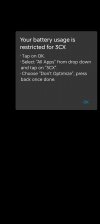
Unable to proceed past battery usage restriction prompt (Android 14 & V20)

Status
Not open for further replies.

ZJ-Kristopher

Customer
Joined
Jun 27, 2023
Messages
8
Reaction score
1
Hello, I'm unable to proceed as 3CX does not show up as an option to optimise battery on Android 14. See attached. As such I am unable to proceed setting up the app on my device. Any assistance would be appreciated.
 

Attachments

Hi @ZJ-Kristopher
Thanks for your feedback.

Can you please tell me what device brand and model you are using?

Also did you try to check if the 3CX app is visible in the Personal Tab of battery optimization?

Thanks
 
Good morning @ThomB_3CX,

It's a OnePlus 10 Pro.

I did indeed check the personal and doesn't show either. See attached for confirmation.

Kind regards
 

Attachments

Hi @ZJ-Kristopher

Could you kindly do the following. Leave the app as it is installed + already provisionined.
Exit the app
Go to Settings
Battery
More Settings
Optimize battery use
Search for 3CX in that list
Tap on 3CX app and select Don't optimize.
Reopen the app and tap on ok within the battery usage popup
 
Good morning @ThomB_3CX,

No luck here unfortunately. 3CX doesn't show up.
 

Attachments

  • Screenshot_2024-01-08-11-21-29-17_0ba066473b79d6e213a1f6f52505e2ee.jpg
    Screenshot_2024-01-08-11-21-29-17_0ba066473b79d6e213a1f6f52505e2ee.jpg
    140.2 KB · Views: 12
Hello, wanted to chime in to say I'm experiencing an issue with this same behavior as well, though for different reasons.

We have a number of android devices deployed to our warehouse team and drivers; these devices are locked down and managed with MDM (Esper.io) so the devices can only run the necessary line-of-business apps (e.g. to prevent device users from installing random crap and/or using the work devices for watching videos, web browsing, etc).

The device deployments included 3CX. When the device is assigned to the user, they could simply log in to the web app, scan the QR code, then they were good to go. All required permissions are granted to the 3CX app by the MSM platform as a managed app.

However, since v20 now REQUIRES/FORCES the user to set the battery management setting in order to continue to use the 3CX app, we can no longer use the 3CX app since the devices are locked down thus do not allow users access to the Settings app.

Is there a way this setting can be bypassed for managed devices without access to the Settings app? I have inquired with the MDM provider, and there is no means of setting the Battery Restriction setting for the 3CX app via MDM.

In short, please either allow for the 3CX app to be used without changing the Battery Restriction setting or allow a way for this check to be disabled on managed devices (such as with managed configurations).

We won't be deploying warehouse/truck devices which are not locked down and managed, so if this challenge cannot be surmounted, then it may require re-evaluation of our VOIP phone system selection.

Edit: Managed devices for employees are Pixel 6a's running Android 14
 
Last edited:
Reading the blog post it sounded to me like if that was off the app would not (be able to) run in the background...
 
Reading the blog post it sounded to me like if that was off the app would not (be able to) run in the background...
I can confirm this is NOT the case in my personal experience; my personal device is a Pixel 8 running Android 14. I have NOT performed these steps from a 3cx blog post for existing users on my personal device and have confirmed the Battery Restriction setting for the 3cx app on my personal device is set to the default Optimized value and the app works fine to my knowledge. I have no known/realized issues with receiving incoming call notifications despite the Battery Optimization setting not being set as the 3CX app is now requiring.

What I CAN also confirm is that the 3CX app is unable to be used at all, in any way whatsoever, foreground or background, for those with a fresh install of the 3CX app on my managed devices since the user cannot in any way proceed past the Your battery usage is restricted for 3CX notification since the settings app/page cannot be launched/access on the locked-down managed devices thus the user can never ever proceed past that notification to use the 3CX app in any way, leaving my users with those deployed devices without the ability to use 3CX at all, full stop.
 
@ZJ-Kristopher is your issue similar to fonashr? Does your device run an MDM solution?

 
@ZJ-Kristopher is your issue similar to fonashr? Does your device run an MDM solution?

Hiya, yes, we use Microsoft Intune, however ours isn't as locked down and as from the photo's I've posted I can access the battery permissions, just the app doesn't show as an option.
 
Status
Not open for further replies.

Members Online Now

Forum statistics

Threads
111,831
Messages
589,277
Members
164,660
Latest member
RJenkinsROCK