





V20, Beta 3, Android 14 Support.
If you’ve upgraded your smartphone to Android 14, well done! We all know how important it is to keep the OS up to date. For the 3CX app to continue to work efficiently, however, you’ll need to grant some additional permissions. Follow the steps below to do this.
#1 Battery Optimization

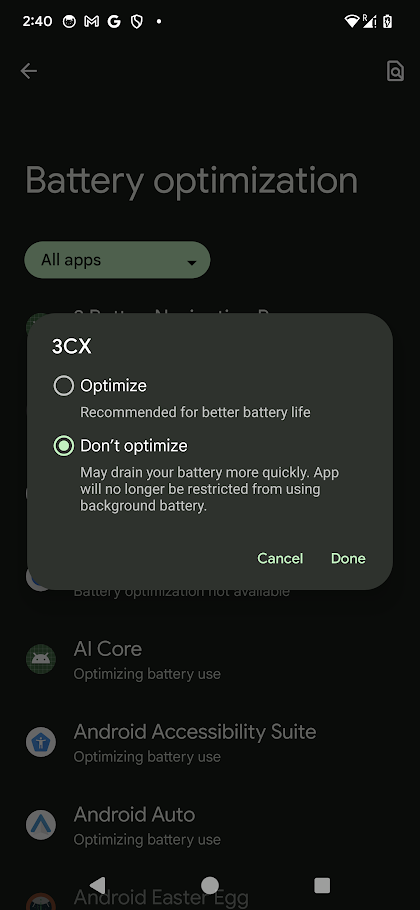
Google Pixel users running Android 14 must give unrestricted battery access to the 3CX app.
Fresh Installs
These are handled in the Wizard. You’ll be presented with a dialog ‘Your battery usage is restricted for 3CX’. Please follow the steps below to give unrestricted battery usage to 3CX:
- Tap on OK in the dialog
- Select “All Apps” from the drop down and tap on “3CX”
- Choose “Don’t Optimize”, tap on Done and go back to your 3CX app to complete the Wizard.
Existing users
Follow these steps:
- Open the hamburger menu in the top left corner
- Tap on “Settings” > “Advanced”
- Search for “Switch off battery usage optimization” and turn on the switch
- Select “All Apps” from the drop down and tap on “3CX”
- Choose “Don’t Optimize”, tap on “Done” and go back to your 3CX app.
#2 Full Screen Notification on Locked Screen
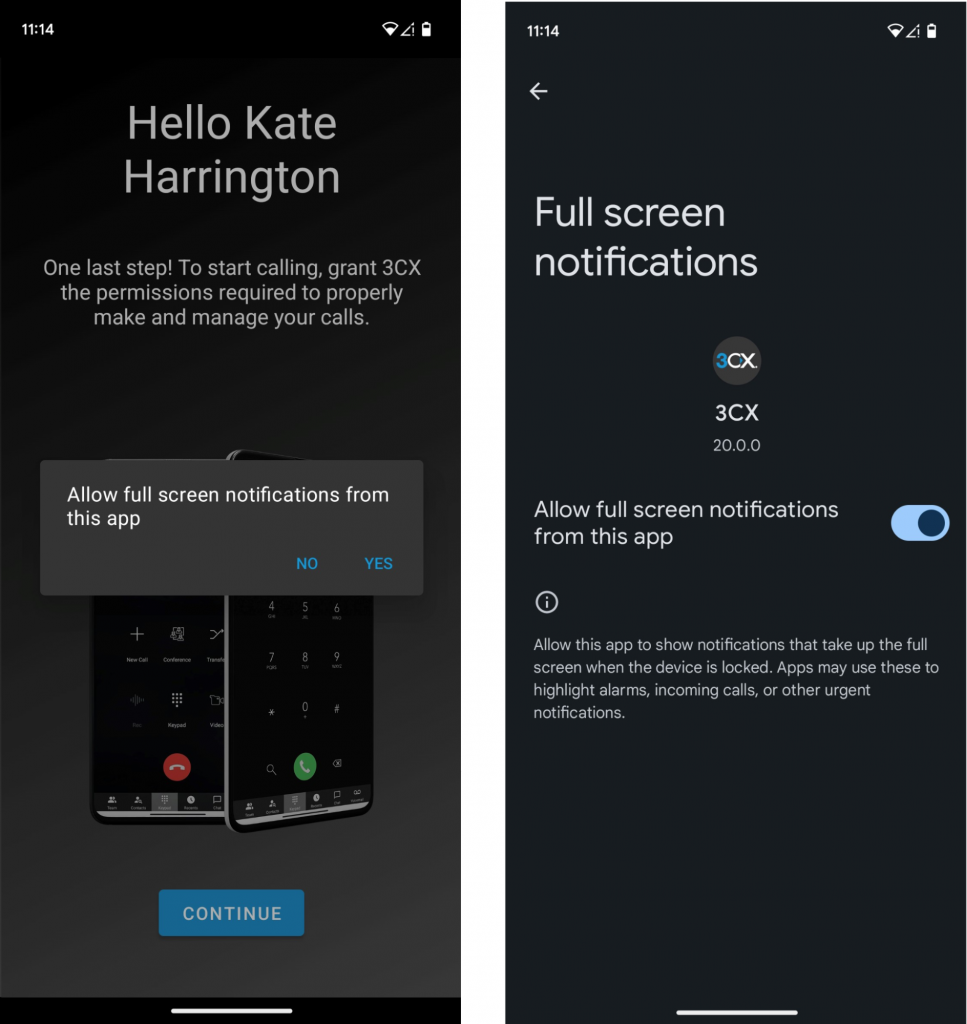
Android 14 requires additional permission to allow users to answer calls from their locked screen.
Fresh Installs
These are handled in the Wizard. You’ll be presented with a dialog titled ‘Allow full screen notifications from this app’. Follow the steps below:
- Tap on “Yes” in the dialog
- Turn on the switch to “Allow full screen notifications from this app” in the redirected screen
- Go back to your 3CX app to complete the Wizard.
Existing Users
Should automatically have this permission enabled by the OS. If not, please follow the steps below:
- Open the hamburger menu in the top left corner
- Tap on “Settings” > “Advanced”
- Search and tap on “Answer on lock screen” setting
- Turn on the switch to “Allow full screen notifications from this app” in the redirected screen and go back to your 3CX app.
Known Issue with Google Pixel Telecom API
We’ve found a few issues with the telecom API on Google Pixels in Android 14 and have temporarily disabled it until we clear the matter with Google. Watch this space for more updates!
Try the Android Beta
Join our Beta testing program and try out the latest Android Beta update! Download the app from the Google Play Store. View the complete changelog history.









 Copyright © 2026