Solved unable to select MCU on PBX Express

Status
Not open for further replies.

nisu

Joined
Jun 28, 2017
Messages
4
Reaction score
0
Hi,
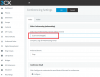
I am testing PBX Express hosted in the cloud with 3CX demo account. I am unable to select MCU server location.

Can someone direct me to solve the issue? Please see attachment

Thanks
Sonny
 

Attachments

  • mcu.png
    mcu.png
    30.2 KB · Views: 18
This typically happens upon license key and FQDN conflicts where your current license was previously used on an other PBX Installation with a different FQDN. Could you please provide me with your PBX or WebMeeting FQDN?
 
Dear Leonidas,

Thank you for your response.
PBX FQDN is nisu.3cx.sg
Webmeeting FQDN: nisu-sg.3cx.net

Cheers,
Sonny
 
Not sure exactly what's happened here. Could you please restart your 3CX System Service?
 
I used hosted cloud with 3CX demo account. How can i restart the service?
 
You can restart services by logging in the management console and accessing the services tab on the dashboard.
From there you can restart all services.
Also make sure that you are using a supported browser to access the management console like google chrome
 
Thanks a lot guys. It is now working.
 
Status
Not open for further replies.