Unable to sync Office 365 Photos

Status
Not open for further replies.

grp_cyr

Customer
Joined
Jul 10, 2020
Messages
20
Reaction score
12
Hello,

Lasts days, we've upgraded our instance from V16 to V18.

We've set the Office 365 integration.

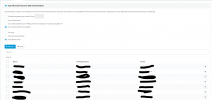
Status is ok :

1632985122424.png

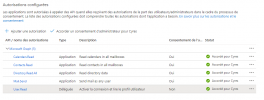
I've ask for user sync in this way :
1632985212730.png

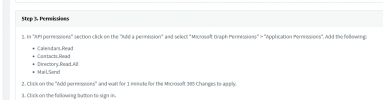
Persmission :
1632984964887.png

But my photos can't be synced :

3cxSystemService.log :
2021/09/30 05:00:15.503|27570|0045|Erro|ClientException while running Office365DirectoryReader.GetAndSaveUserPhotoAsync for user [email protected]: Code: ErrorNoPermissionsInAccessToken Message: Exception of type 'Microsoft.Fast.Profile.Core.Exception.ProfileAccessDeniedException' was thrown. Inner error: AdditionalData: date: 2021-09-30T03:00:15 request-id: 8559d13e-0b4d-44ef-8ecd-ed6304c17800 client-request-id: 8559d13e-0b4d-44ef-8ecd-ed6304c17800 ClientRequestId: 8559d13e-0b4d-44ef-8ecd-ed6304c17800

Did i miss something ?
 
Same issue here, but haven't further investigated. New setup of Microsoft 365 integration on the latest stable versions, hosted by 3CX
 
  • Like
Reactions: grp_cyr
Yes.
Our Exchange is on premise and we sync users to Office 365 through Azure AD Connect. So yes, all mailboxes are on premise.

I can't delete my user.

I've created a new user in my AD + Exchange, he's sync to O365. I created it in 3CX with right email . I'm waiting to see if photo will by synced to 3CX.
 
Hello,
A quick update :
My test account isn't updated. But i can't find error in logs

I also noticied that my calendar is synced from Exchange on premise to Teams, but can't be synced to 3CX :
2021/10/01 08:27:17.115|27570|0088|Erro|Error while Office365SubscriptionManager.UpdateSubscription Create subscription for resource: Users/[email protected]/calendar/events changeTypeExpected: created,updated,deleted Exception: Code: ExtensionError Message: Operation: Create; Exception: [Status Code: NotFound; Reason: The mailbox is either inactive, soft-deleted, or is hosted on-premise.]
 
Hello,

After a weekend, i still have no sync between O365 and my 3CX :
2021/10/04 10:29:32.473|27570|0041|Erro|ClientException while running Office365DirectoryReader.GetAndSaveUserPhotoAsync for user <mail>: Code: ErrorNoPermissionsInAccessToken Message: Exception of type 'Microsoft.Fast.Profile.Core.Exception.ProfileAccessDeniedException' was thrown. Inner error: AdditionalData: date: 2021-10-04T08:29:32 request-id: eb1877aa-22e1-4223-89e9-94cc0fee949a client-request-id: eb1877aa-22e1-4223-89e9-94cc0fee949a ClientRequestId: eb1877aa-22e1-4223-89e9-94cc0fee949a
 
In the M365 configuration settings in 3CX Settings --> Microsoft 365, there are instructions to allow these rights for your Application that you have created:
1633511448499.png

For the same applications you have already created, could you please also add the permission for:
  • User.Read.All
Do this in exactly the same way as you did for the other rights.

Let me know if this fixes the issue and photo sync the works.

Tip:
Once you add this right, from the Dashboard --> Services, select and restart the System Service.
 
Hi,

I've added the User.Read.All permission. I no longer have errors in logs, but photos are not synced :
1633513814526.png

1633513823225.png

You can find logs of creation attached
 

Attachments

Hi,

I've added the User.Read.All permission. I no longer have errors in logs, but photos are not synced :
View attachment 24891

View attachment 24892

You can find logs of creation attached
In hybrid setups where the user is being synced from an on-prem AD/Exchange and the mailbox is on the on-prem server, Photo sync will not work.
Although some M365 online resources will show the photo, unfortunately the API we use will not return the photo.

Is this the scenario of your user(s)?
 
In hybrid setups where the user is being synced from an on-prem AD/Exchange and the mailbox is on the on-prem server, Photo sync will not work.
Although some M365 online resources will show the photo, unfortunately the API we use will not return the photo.

Is this the scenario of your user(s)?

Right. It's my configuration.

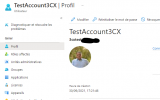
My user have an image on my Active Directory :
1633521025654.png
The image is synced to AAD :
1633521065593.png

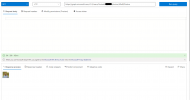
And the image can be pulled through API :

1633521005672.png

So i can understand some restrictions, but in my case, as the image is able to be get through API, i can't understand where is the limitation.

Furthermore, i can't find any informations about these restriction on your website/documentation.
 
Right. It's my configuration.

My user have an image on my Active Directory :
View attachment 24899
The image is synced to AAD :
View attachment 24900

And the image can be pulled through API :

View attachment 24898

So i can understand some restrictions, but in my case, as the image is able to be get through API, i can't understand where is the limitation.

Furthermore, i can't find any informations about these restriction on your website/documentation.
You are right, this limitation is not mentioned online as we are hoping with that with some changes MS is doing to the Graph API, they will allow this, but it is currently something that we have ran into before.

OK, now that you have added the "User.Read.All" right, repeat the same test again. Turn Verbose on from Dashboard --> Activity Log --> Settings, then from Dashboard --> Services, select the System Service and restart it.

In the logs, do you see any error similar to this?
Code:
Erro|Error while Office365SubscriptionManager.UpdateSubscription Create subscription for resource: Users/<email>/calendar/events changeTypeExpected: created,updated,deleted Exception: Code: ExtensionError
Message: Operation: Create; Exception: [Status Code: NotFound; Reason: The mailbox is either inactive, soft-deleted, or is hosted on-premise.]
Inner error:
    AdditionalData:
    date: 2021-10-06T09:35:02
    request-id: 66a8dd16-c656-4dc3-b9ea-bd8afe555295
    client-request-id: 66a8dd16-c656-4dc3-b9ea-bd8afe555295
ClientRequestId: 66a8dd16-c656-4dc3-b9ea-555afe893295
 
You are right, this limitation is not mentioned online as we are hoping with that with some changes MS is doing to the Graph API, they will allow this, but it is currently something that we have ran into before.

OK, now that you have added the "User.Read.All" right, repeat the same test again. Turn Verbose on from Dashboard --> Activity Log --> Settings, then from Dashboard --> Services, select the System Service and restart it.

In the logs, do you see any error similar to this?
Code:
Erro|Error while Office365SubscriptionManager.UpdateSubscription Create subscription for resource: Users/<email>/calendar/events changeTypeExpected: created,updated,deleted Exception: Code: ExtensionError
Message: Operation: Create; Exception: [Status Code: NotFound; Reason: The mailbox is either inactive, soft-deleted, or is hosted on-premise.]
Inner error:
    AdditionalData:
    date: 2021-10-06T09:35:02
    request-id: 66a8dd16-c656-4dc3-b9ea-bd8afe555295
    client-request-id: 66a8dd16-c656-4dc3-b9ea-bd8afe555295
ClientRequestId: 66a8dd16-c656-4dc3-b9ea-555afe893295

This message is related to calendar sync of my real user ( Not test ). I don't have any error for my 3CX account test. Can i sent you the log file in private ?
 
This message is related to calendar sync of my real user ( Not test ). I don't have any error for my 3CX account test. Can i sent you the log file in private ?
Yes, I know it is for calendar events, but there is a similar error that could be related to the photo sync.
Sure, generate the SupportInfo ZIP file, upload it to a file sharing service and send it to me in a PM.
 
  • Like
Reactions: Evolute IT
Sure, can tell me how to generate a SupportInfo ZIP ?
 
Sure, can tell me how to generate a SupportInfo ZIP ?
Here's what you need to do in full:
  1. Turn Verbose on from Dashboard --> Activity Log --> Settings
  2. From Dashboard --> Services, select the System Service and restart it.
  3. Check that the image is not synced.
  4. In the Management Console, in the upper-right corner, go to Support and press Generate Support Info. This will send an email the the address you have set as the admin email.
  5. Download the file from the admin email inbox, upload it to a filesharing service of your choice (GDrive, WeTransfer, OneDrive, etc...) and send me the download link in a PM. Along with the link, please tell me the email of the extension that you tested with with and the extension number it is associated with.
 
  • Like
Reactions: Evolute IT
Here's what you need to do in full:
  1. Turn Verbose on from Dashboard --> Activity Log --> Settings
  2. From Dashboard --> Services, select the System Service and restart it.
  3. Check that the image is not synced.
  4. In the Management Console, in the upper-right corner, go to Support and press Generate Support Info. This will send an email the the address you have set as the admin email.
  5. Download the file from the admin email inbox, upload it to a filesharing service of your choice (GDrive, WeTransfer, OneDrive, etc...) and send me the download link in a PM. Along with the link, please tell me the email of the extension that you tested with with and the extension number it is associated with.
Thank you, PM has been sent
 
Status
Not open for further replies.