Unable to use DID for call routing after upgrade to V20

Status
Not open for further replies.

kitcb

SOHO User
Joined
Feb 16, 2019
Messages
15
Reaction score
0
I upgraded my installation to V20 last week. With a little tweaking everything is working correctly with the exception of using DID for call routing. I have two incoming numbers and I have always used their DIDs to route the calls to different ring groups or extensions. Since the upgrade this is no longer working. I am sure that the problem has to do with a missmatch in the way the DIDs are being presented to the system and in the past I would just investigate the activity log and the problem would be apparent. I have searched everywhere and I can not understand where the activity log has gone and how to access this information in V20.
 
Hi, could you please access in the sip trunk ---- DIDs and check where these DIDs are being routed. If these are routed to a system extension, please check that is has a department selected and in that department confirm that the office hours are correct.
 
I suspect the problem is there. I have the SIP trunk set up. when I go to the DID section, I see that both DID numbers have the same call routing. 1705937532828.png
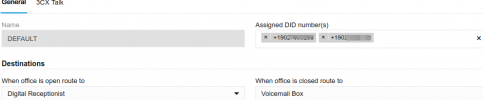
I can not set up a different call routing for the second number. If I go to the call routing for the first number I see that both DID numbers are assigned:

1705937697127.png

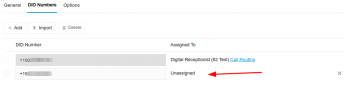
If I remove the second number then when I return to the DID section, I see that it is unassigned and I can not edit it to make any changes.

1705937794055.png
 
Status
Not open for further replies.

Forum statistics

Threads
112,326
Messages
591,900
Members
165,479
Latest member
Senergia