Understand Not Answered Calls

Status
Not open for further replies.

ionut

Basic Certified
Joined
Sep 19, 2017
Messages
53
Reaction score
2
Hi,

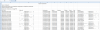
I generated an report type, Not Answered Calls. This report is about external calls to Q CallCenter. Please explain me, why in ringing column I have for some calls 00:00:01 and 00:00:00 and why in talking column I have different seconds, if the call is not answered?
I attach an example here.

Thank you,
 

Attachments

  • Capture.PNG
    Capture.PNG
    66 KB · Views: 31
This report if not mistaken is the "Call Reports" type which is not tailored for Queues. The first thing to explain is the ringing time. When a caller calls into a Queue, technically the call is answered immediately and the caller starts hearing music on hold. That is why you see ringing 0 or 1 seconds, because ringing is nearly non-existent and all calls are considered as "Connected". Because they are considered "Connected", that means that they have "Talking" time, which translates to how long have they been connected for. Now the "Status" column tells if the call was actually answered by a Queue Agent or not.

I hope this explain the report results. That is also why we have Queue-specific report types, we have tailored those specifically for Queues and present the data in a more comprehensive manner.
 
Status
Not open for further replies.

Forum statistics

Threads
111,878
Messages
589,525
Members
164,728
Latest member
Depo Dore