- Joined
- Feb 26, 2021
- Messages
- 4
- Reaction score
- 2
Hi,
Essentially I am trying to connect my voip service from Aussie BB (voip provider in Australia) to my 3cx running on my rpi 3b+ fed from my netgate sg-2100 (pfSense box).
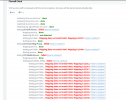
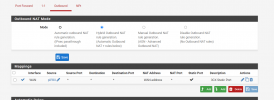
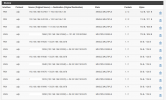
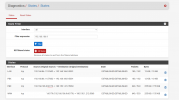
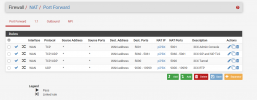
Please see photos for more details of errors and config attached.
So far:
Further Info below;
My current network setup is:
NCD (NBN FTTC) --> (wan port) pfSense box --> pfSense box (port2) setup as vlan2 --> rpi (3cx – ip: 192.168.186.9)
for completeness I also have: --> pfSense box (port1) setup as vlan1 --> google wifi (home network – 192.168.86.0/24)
I followed guides:
(3cx rpi installation guide/walkthrough)
https://www.3cx.com/docs/installing-pbx-raspberry-pi/
https://www.3cx.com/DOCS/pfsense-firewall/
https://www.3cx.com/docs/firewall-checker/
https://www.3cx.com/blog/voip-howto/firewall-nat-pat-stun/
https://pfsense-docs.readthedocs.io/en/latest/nat/forwarding-ports-with-pfsense.html
https://docs.netgate.com/pfsense/en/latest/troubleshooting/nat-port-forwards.html
Best Regards,
Daz
Essentially I am trying to connect my voip service from Aussie BB (voip provider in Australia) to my 3cx running on my rpi 3b+ fed from my netgate sg-2100 (pfSense box).
Please see photos for more details of errors and config attached.
So far:
- I can successfully register my AussieBB voip to 3cxPBX (sip/trunk) 3cx green light
- I am using the 3cx client on my mobile via android app (I don't own ip handset) on wifi
- I cannot call my voip number on an outside line (4g)
- I have forwarded all ports (inbound and outbound -checked multiple times and recreated them just in case), tried resetting state tables, tried PureNAT, NAT + Proxy, Nat disabled, enabled/disabled Enable NAT Reflection for 1:1 NAT and Enable automatic outbound NAT for Reflection, power cycling the rpi and pfsense, and all combinations of the above.
- I think the firewall port forwarding is working as there are times when running the firewall checker and checking the states on the pfSense box it shows an external ip address 5060 mapping to rpi ip:5060. However there also some inconsistent reports as well as port 60179 being mapped to 5060. I don't know where that is coming from!?
- cannot access the 3cx server/gui webpage on rpi by the url provided to me only by the local ip address
- In 3cx settings on my rpi should the 3cx gateway reflect the pfSense box address 192.168.186.1 or is it correct in that it is showing the rpi ip address?
- I have pfSense using 9.9.9.9 DNS override. Would that be an issue? (I have changed nothing else) I think my VOIP provider mentioned if calling not working they have DNS addresses I could add. Don't know where to input them though.
Further Info below;
My current network setup is:
NCD (NBN FTTC) --> (wan port) pfSense box --> pfSense box (port2) setup as vlan2 --> rpi (3cx – ip: 192.168.186.9)
for completeness I also have: --> pfSense box (port1) setup as vlan1 --> google wifi (home network – 192.168.86.0/24)
I followed guides:
https://www.3cx.com/docs/installing-pbx-raspberry-pi/
https://www.3cx.com/DOCS/pfsense-firewall/
https://www.3cx.com/docs/firewall-checker/
https://www.3cx.com/blog/voip-howto/firewall-nat-pat-stun/
https://pfsense-docs.readthedocs.io/en/latest/nat/forwarding-ports-with-pfsense.html
https://docs.netgate.com/pfsense/en/latest/troubleshooting/nat-port-forwards.html
Best Regards,
Daz