- Joined
- Nov 10, 2022
- Messages
- 11
- Reaction score
- 2
Hi folks,
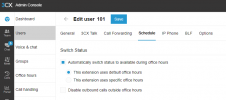
We have set Oot Of Office hours of 9am - 8pm on the Options - Language and Office Hours page. However this does not put our phones into DND mode outside of those times. Is that normal?
When the office is closed it is set to go to the IVR.
This query has come from our CEO getting a call from my deskphone at 5:20 am this morning while the cleaners were in, it turns out they were just cleaning the phones and hit the redial button by accident.
Her mobile app rang through and wasnt very happy with me.
The issue happened from two internal extensions contacting each other at out of office times.
Is there a way to automatically enable DND on the deskphones / apps at out of office times? or does DND have to be done manually?
We have set Oot Of Office hours of 9am - 8pm on the Options - Language and Office Hours page. However this does not put our phones into DND mode outside of those times. Is that normal?
When the office is closed it is set to go to the IVR.
This query has come from our CEO getting a call from my deskphone at 5:20 am this morning while the cleaners were in, it turns out they were just cleaning the phones and hit the redial button by accident.
Her mobile app rang through and wasnt very happy with me.
The issue happened from two internal extensions contacting each other at out of office times.
Is there a way to automatically enable DND on the deskphones / apps at out of office times? or does DND have to be done manually?