Unsupported SIP Trunk

Status
Not open for further replies.

vlt

Bronze Partner
Joined
Oct 19, 2021
Messages
16
Reaction score
1
Hello,

I'm running a on-premise PRO version of 3cx, as a trial - using it to demo for a client, to test quality.

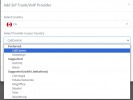
I've read that this is the only way to use an unsupported SIP Trunk, but i can't choose this option, it doesn't show up anywhere when i try to add a SIP Trunk / VoIP Proivder.

Please Advise.
 
Hi @vlt unsupported trunks should be added as generic --- voip provider on dedicated installations, that is the only way.

However if you plan to use the 3CX system we highly recommend the use of a supported voip provider which are providers who has performed interoperability tests with us, so you can use a template and it will work out of the box.
 
There is no Generic Option,

We have about 6 3CX installations, and we use the same provider.

They used to be supported, but it doesn't show up anymore.

How can i get tis going so i can have one of our clients test?

1692111138855.png
 
You are searching in the wrong dropdown menu. Check the Select country list instead.
 
Last edited:
  • Like
Reactions: vlt
There is no Generic option in the country list, i've gone through most of them already.
 
Ahhh NEvermind i found it
 
Status
Not open for further replies.

Forum statistics

Threads
111,974
Messages
590,081
Members
164,899
Latest member
mazet