Update 6 Beta Available Now

Status
Not open for further replies.
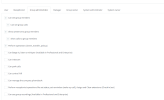
With new group roles, you can't edit them. So if the user is a group admin or group owner then you can't do basic operations like intercom or Park becuase it wont let you tick them.

Most people have one company email address and one 3cx user.. So this user should be able to be a manager and a group owner/admin role. Or at least have options to change the greyed out options.

Generally in a small business the manager is also the owner. So the group owner or the group admin should also have option to be the group manager as well.
1672268112764.png

Also what is the process if a company has multiple business names or multiple divisions. Obviously if the company is larger then you would create multiple groups one for each business name or divisions of the business.

But in most small businesses especially in Australia, you see a business multiple companies and one person being the owner in charge of programming both.

Will there ever be an option for one user to select which group the wish to program from the web client?
So one user then can be part of multiple groups and then in the admin area have drop down option with both groups so you can select which group they want to program?

This would also make it easier for a 3cx partner to program multiple groups for them.
 
Last edited:
anyone else seeing errors trying to install the beta over an SP5 instance? we're looking at our test system and upgraded it and getting these kinds of errors. Our next move is to take a backup, do a purge of 3cx and install the beta & restore the data. But just wanted to see if there was something I'm missing.

Code:
Updating from Version 18.0.5.418
Loading global scripts...
Loading instance scripts...
Loading instances...
CurrentDbVersion=542
Updating global DB tables...
Applying script for all instance tables
Loading instance parameters from phonesystem_mastertable
Updating instance DB tables...
Replacing parameters
Npgsql.PostgresException (0x80004005): 42601: syntax error at end of input
   at Npgsql.NpgsqlConnector.<ReadMessage>g__ReadMessageLong|194_0(NpgsqlConnector connector, Boolean async, DataRowLoadingMode dataRowLoadingMode, Boolean readingNotifications, Boolean isReadingPrependedMessage)
   at Npgsql.NpgsqlDataReader.NextResult(Boolean async, Boolean isConsuming, CancellationToken cancellationToken)
   at Npgsql.NpgsqlDataReader.NextResult()
   at Npgsql.NpgsqlCommand.ExecuteReader(CommandBehavior behavior, Boolean async, CancellationToken cancellationToken)
   at Npgsql.NpgsqlCommand.ExecuteReader(CommandBehavior behavior, Boolean async, CancellationToken cancellationToken)
   at Npgsql.NpgsqlCommand.ExecuteScalar(Boolean async, CancellationToken cancellationToken)
   at Npgsql.NpgsqlCommand.ExecuteScalar()
   at Updater2Db.UpdateInfoExtractor.ExecuteScript(String sqlQuery, String transactionName, Exception& err)
  Exception data:
    Severity: ERROR
    SqlState: 42601
    MessageText: syntax error at end of input
    Position: 36
    File: scan.l
    Line: 1119
We upgraded our test system in AWS lightsail and it upgraded fine.
 
@jvivona This is invariably because you are not running a stock ISO or have made modifications or installed a third party app....
@tronic - A group owner has all the rights of the manager. If a group owner is part of multiple groups he is a group owner of all. But you can also make them system owner in which case the business owner can modify all groups without being a member of them. Its better to keep a user a member of as few groups as possible. Ideally just 1.
 
  • Like
Reactions: tronic
@jvivona This is invariably because you are not running a stock ISO or have made modifications or installed a third party app....
that's correct - some of these systems (including our test system) are ones that have upgraded/evolved from version to version + OS upgrades (deb 9 to 10). 15 to 15.5 to 16 to 18 - so "stock ISO" for those haven't been in effect for a while. we've not had a problem with any of the other SPs or major version upgrades - so this is a little bit of a surprise. I'm not sure why/how a progress syntax error is related to the "stock ISO" discussion - but we will figure it out on our end.
 
  • Like
Reactions: Evolute IT
@jvivona OK..... Well we will look at the error after our devs return from the holidays. Maybe you can save some logs just in case?
 
  • Like
Reactions: Evolute IT
If I am correct, a user without an assigned DID will be able to select from any DID to use.
The documented location for this on the user account seems to be missing in beta 6, I also don't yet see where you can disable this ability for a user yet. I think by default anyone can send and select the associated number.
 
  • Like
Reactions: Evolute IT
I already has Facebook integration that worked but now is not available I'm not using the startup its on promise PBX
in the WEBCLIENT there is nothing about the Facebook

sorry i can see the facebook under Admin in the webclient but the old integration is gone
Yes the old way is gone, their is a process to get it back that is documented but forewarning, its not going to be fast or easy.
https://www.3cx.com/docs/manual/facebook/
FB Dev was a pain before and they recently laid off 11,000 employees!
 
Last edited:
  • Like
Reactions: tronic
Is something still to come regarding IP Phone SBC functionality that was announced in Alpha 6? I'm running Beta 6 and seeing the following:

Looking at a user in the admin console User > Ext 111 > Phone Provisioning for a Yealink T54W. It has 3CX SBC selected as the provisioning method and a server identified via drop down.
In the desktop client under admin > Users > Ext 111 and I see no reference to SBC but "Routing device" drop down thats blank (Don't see the SBC that is set under admin console). I also don't see where I can set a phone as an SBC if I wanted.
 
Last edited:
@jvivona OK..... Well we will look at the error after our devs return from the holidays. Maybe you can save some logs just in case?
Nick - I love you all - I know it's BETA.. Just asking - if I'm the only one I don't want to waste resources - that means it's either a quirk - as I've only tried this 1 test server (we have a hyper-v snapshot and we can reproduce if needed - I got the log via email - I can supply) or something specific with this multi-upgraded version.. What we did to work around it on the exact same server (in case anyone needs it)...

<take a backup & download>
apt purge 3cxpbx
apt-get install 3cxpbx=18.0.6.889
<walk through normal install on linux, go to web interface http://<ip>:5015?v=2 and restore the backup>

we're up and running w/SP6 & testing. Seems like the database scripts are potentially different via the 2 upgrade paths - but I have not dug in further. NP - if our biggest issue is backup / purge / restore - we'll plot a plan around it.... 90% of our clients - we can do this in a small window for them. Only about 30-35 instances would we need any significant downtime (recordings, size of install, etc). And of course with our windows installs - we would just do an uninstall / reinstall to solve it.

Not a major issue - was just trying to figure out our effort requirements for this pathway.

we're testing SP6 and trying to re-write our "manual" for how we pitch, deploy and manage - we've seen some good stuff and some stuff we're still trying to figure out. we'll get there (sometimes you have to drag us kicking & screaming, but we'll get there).
 
Last edited:
  • Like
Reactions: N_G
Is something still to come regarding IP Phone SBC functionality that was announced in Alpha 6? I'm running Beta 6 and seeing the following:

Looking at a user in the admin console User > Ext 111 > Phone Provisioning for a Yealink T54W. It has 3CX SBC selected as the provisioning method and a server identified via drop down.
In the desktop client under admin > Users > Ext 111 and I see no reference to SBC but "Routing device" drop down thats blank (Don't see the SBC that is set under admin console). I also don't see where I can set a phone as an SBC if I wanted.
You can only add a router phone via the webclient, not management console.
A guide of sorts can be seen here: https://www.3cx.com/blog/releases/v18-update-6-alpha/
 
  • Like
Reactions: tronic and N_G
@SyncWave DID assignment, Router phones etc all via Web client Admin section. Help has been updated so have docs, maybe take a look at them.

@jvivona Thanks for the headsup :) A backup restore should not be necessary - try on a few more systems if you dont mind and if it does happen we can look at it. It could also be a custom parameter setting or something. The reason it has to be a clean ISO is because otherwise the number of combinations in terms of package versions etc becomes impossible to script and test for. having said that, the beta is out there to capture exactly these types of things, it could be something else so if you have a moment to try on additional systems it would be greatly appreciated.
 
  • Like
Reactions: Evolute IT
@SyncWave In regards to Facebook - I dont really recommend it. With Fbook, you have your communications controlled by FB and they can switch off your app anytime they like. And they do ...and there will be nothing you can do.

Use livechat instead. it will be on your website - you can capture name and email, and all comms are direct and controlled by customer. Now also, say you have a customer which has a hotel or restaurant and they use Fbook to send and receive messages to new and existing customers.... You would think, its just a small business Fbook doesnt care. But Fbook is capturing all this data. We dont care about the message content but Fbook is capturing for example who is looking for a hotel or restaurant in the area.

Then Fbook will push competitive hotel or restaurant options to those customers in their Fbook feed. So even for small customers its better to use live chat as otherwise their customers and leads will see their competitors appear in the feed of existing or potential customers.

3CX Fbook is also targeted by competitors. And we target those of say Avaya... It sounds good at first but it works two ways and for all sizes of business.

I hope i explained myself properly :)
 
@G.BOURGEOIS The way to do it is to forward the call to the group IVR. At this point the time rules kick in of the group and you have your different destinations based on time. Then you can send to the IVR. So not the other way round....
 
  • Like
Reactions: Evolute IT
@G.BOURGEOIS The way to do it is to forward the call to the group IVR. At this point the time rules kick in of the group and you have your different destinations based on time. Then you can send to the IVR. So not the other way round....

Hi,
Thank you for taking the time to answer me.
In order to validate that I understood your answer correctly, I understand that the « new » schedule mechanism (per Group) only applies to an inbound rule and auto-Switch status (in extensions). Therefore, entreprise who do not have multiples DIDs, will not be able to take advantage of the functions shown in my screenshot. Did I understand correctly?

0EBFBF3A-6812-46F6-A069-332221D29713.jpeg

If I understood correctly, no worries, we're crossing our fingers (for luck) that a future version of Call Flow will support configurable time-based conditions in groups.

If CallFlow does not intend to support conditions based on "group schedules", well, the solution will remain to configure status routing rules on a dedicated extension... and activate the auto-Switch.

We will find a solution :-)


Gratefully,
 
  • Like
Reactions: tronic and jed
@G.BOURGEOIS The way to do it is to forward the call to the group IVR. At this point the time rules kick in of the group and you have your different destinations based on time. Then you can send to the IVR. So not the other way round....

Hi,
Thank you for taking the time to answer me.
In order to validate that I understood your answer correctly, I understand that the « new » schedule mechanism (per Group) only applies to an inbound rule and auto-Switch status (in extensions). Therefore, entreprise who do not have multiples DIDs, will not be able to take advantage of the functions shown in my screenshot. Did I understand correctly?

View attachment 33368

If I understood correctly, no worries, we're crossing our fingers (for luck) that a future version of Call Flow will support configurable time-based conditions in groups.

If CallFlow does not intend to support conditions based on "group schedules", well, the solution will remain to configure status routing rules on a dedicated extension... and activate the auto-Switch.

We will find a solution :)


Gratefully,
I agree that it would be nice to be able to send a call from an IVR (with an assigned DID) to a group, so that the group routing can then use its own hours to route properly.

This can be useful for bigger companies where they have different departments but only one DID going to a main IVR, before splitting it to different groups of other IVRs.

Otherwise, you would need a callflow to do that kind of complex routing.

Simply add "Send to group" in the IVR destinations and that would be perfect :)
 
Hi,
Thank you for taking the time to answer me.
In order to validate that I understood your answer correctly, I understand that the « new » schedule mechanism (per Group) only applies to an inbound rule and auto-Switch status (in extensions). Therefore, entreprise who do not have multiples DIDs, will not be able to take advantage of the functions shown in my screenshot. Did I understand correctly?

View attachment 33368

If I understood correctly, no worries, we're crossing our fingers (for luck) that a future version of Call Flow will support configurable time-based conditions in groups.

If CallFlow does not intend to support conditions based on "group schedules", well, the solution will remain to configure status routing rules on a dedicated extension... and activate the auto-Switch.

We will find a solution :)


Gratefully,
I come from legacy telco and totally agree with you that time based routing was a lacking feature in 3cx compared to older legacy PBX.
With the group based routing it closes a huge gap, but still doesn't cover all areas.

Such as Time/date based routing and option to change no answer destination in queue based on this.
Not all situations can be fixed with open or closed based routing.

But I find that with older systems they have aligned there processes with what the old legacy system could do. But it doesn't mean that the previous method was the best way to do things. If they open there mind and start the process again then you find that the logic of the 3cx does make more sense than a lot of previous legacy systems methods.
 
  • Like
Reactions: Evolute IT
@gbourgeois You can use the time routing logic also with just one DID or Main trunk number. You just have to route it to the Group. Looking at your screenshot, just above the yellow box you made, there is a drop down assigned DID numbers. You select your main trunk or DID there, so that all calls will go to this "mini IVR" Then you can forward to your main IVR or queue based on time below. Its meant to be before an IVR, not after it.

Infact that is how startup works, each startup tenant is its own group and all calls are forwarded to the mini IVR.

@tronic - Well you can have as many groups as you want so you can easily make different hours and no answer (&break) per queue if you like..... But in effect you can have 2 no answer options - no answer based on time before it hits queue and no answer based on open but not answered (otherwise it did not hit the queue). So you have quite a lot of options open to you.

now compare that to old situation (which still works)
Only one set of global office hours, now you can have one per group, with as many groups as you like.
Only open and closed, not open closed and break. So 3 instead of 2 and we will add holiday as well next year.

@tronic Thats a good point about old processes. Yes, times have changed and some processes can be re-thought with the new reality and technology. Its important as a reseller to point this out as otherwise you end up in a situation that is difficult to support going forward. Better to tell them about the new options and better ways of doing things. Everything can be rethought and in most cases in a better way.
 
Last edited:
@gbourgeois You can use the time routing logic also with just one DID or Main trunk number. You just have to route it to the Group. Looking at your screenshot, just above the yellow box you made, there is a drop down assigned DID numbers. You select your main trunk or DID there, so that all calls will go to this "mini IVR" Then you can forward to your main IVR or queue based on time below. Its meant to be before an IVR, not after it.

Infact that is how startup works, each startup tenant is its own group and all calls are forwarded to the mini IVR.

Yes, yes, I understand. :confused:
Respectfully, I do not insist, If you want examples of scenarios where routing by department (group) without DID (or internal routing with dummy DID) would be an added value, let me know.
You can count on my full cooperation. :) (sincerely) .

These may be "edges cases".

As I mentioned in my previous message, we will certainly find in 3CX an alternative solution (Dummy extension with auto-switch, or call flow) if 3CX did not provide a solution directly in the IVR.

Good day and happy New Year ! :)


Thank you for accepting to answer my messages,
I am sincerely very grateful.
Please accept my apologies for my past bad interactions.
Get my greatest gratitude.

 
Last edited:
  • Like
Reactions: N_G and Evolute IT
@Nick Galea has something changed with the console restrictions in this build? Just installed the BETA and shortly thereafter, noticed that I have #$#@ trying to login to the console from random IPs. My 3CX instance is locked down to only allow a range of IPs (and these aren't on the allowed list) of IPs that should be even able to get to the console, let alone try to login.
For years prior to this, this has been working fine and we never even saw any attempts due to the console IP 'allowed only' list, and 'Automatic Global 3CX IP Blacklist' always being enabled.

Also noticed that these IP's are NOT being auto added to the 'IP Blacklist' due to too many failed attempts...
GMT is +11 ADST

  • User or password is invalid from 84.239.14.171. (User: 1000, password: 123456)
    3CX Phone System Management Console ID: 30037 02/01/2023 19:52:56
  • User or password is invalid from 74.208.16.235. (User: 00000, password: Test123!)
    3CX Phone System Management Console ID: 30037 02/01/2023 18:59:35
  • User or password is invalid from 74.208.16.235. (User: 00000, password: Welcome123!)
    3CX Phone System Management Console ID: 30037 02/01/2023 18:59:30
  • User or password is invalid from 74.208.16.235. (User: 100, password: Welcome1234!)
    3CX Phone System Management Console ID: 30037 02/01/2023 18:59:21
  • User or password is invalid from 74.208.16.235. (User: 110, password: Password123!)
    3CX Phone System Management Console ID: 30037 02/01/2023 18:59:18
  • User or password is invalid from 93.125.114.64. (User: 10, password: 3cx@1234)
    3CX Phone System Management Console ID: 30037 02/01/2023 18:58:47
  • User or password is invalid from 93.125.114.64. (User: 11, password: 123000)
    3CX Phone System Management Console ID: 30037 02/01/2023 18:58:47
  • User or password is invalid from 93.125.114.64. (User: 1000, password: backup1000)
    3CX Phone System Management Console ID: 30037 02/01/2023 18:58:44
  • User or password is invalid from 77.68.55.34. (User: 101, password: Passw0rd123!)
    3CX Phone System Management Console ID: 30037 02/01/2023 18:53:16
  • User or password is invalid from 77.68.55.34. (User: 100, password: testtest)
    3CX Phone System Management Console ID: 30037 02/01/2023 18:53:13
  • User or password is invalid from 77.68.55.34. (User: 000, password: password123!)
    3CX Phone System Management Console ID: 30037 02/01/2023 18:53:05
  • User or password is invalid from 77.68.55.34. (User: 000, password: Password1!)
    3CX Phone System Management Console ID: 30037 02/01/2023 18:52:48
  • User or password is invalid from 85.215.119.231. (User: 003, password: Test1234!)
    3CX Phone System Management Console ID: 30037 02/01/2023 18:46:31
  • User or password is invalid from 85.215.119.231. (User: 301, password: Test1234!)
    3CX Phone System Management Console ID: 30037 02/01/2023 18:46:31
  • User or password is invalid from 85.215.119.231. (User: 201, password: Test1234!)
    3CX Phone System Management Console ID: 30037 02/01/2023 18:46:18
  • User or password is invalid from 85.215.119.231. (User: 1004, password: Test1234!)
    3CX Phone System Management Console ID: 30037 02/01/2023 18:46:12
  • User or password is invalid from 69.169.14.182. (User: 1310, password: 000000)
    3CX Phone System Management Console ID: 30037 02/01/2023 18:32:18
  • User or password is invalid from 69.169.14.182. (User: 0000, password: !@0000!@)
    3CX Phone System Management Console ID: 30037 02/01/2023 18:32:17
  • User or password is invalid from 69.169.14.182. (User: 000, password: pass@123456)
    3CX Phone System Management Console ID: 30037 02/01/2023 18:32:16
  • User or password is invalid from 82.165.71.76. (User: 401, password: Test1234!)
    3CX Phone System Management Console ID: 30037 02/01/2023 17:46:50
  • User or password is invalid from 82.165.71.76. (User: 301, password: Test123!)
    3CX Phone System Management Console ID: 30037 02/01/2023 17:46:50
  • User or password is invalid from 82.165.71.76. (User: 305, password: Welcome123!)
    3CX Phone System Management Console ID: 30037 02/01/2023 17:46:36
  • User or password is invalid from 82.165.71.76. (User: 203, password: Test1234!)
    3CX Phone System Management Console ID: 30037 02/01/2023 17:46:26
  • User or password is invalid from 82.165.48.86. (User: 301, password: Start1234!)
    3CX Phone System Management Console ID: 30037 02/01/2023 17:46:11
  • User or password is invalid from 82.165.48.86. (User: 502, password: Welcome123!)
    3CX Phone System Management Console ID: 30037 02/01/2023 17:46:02
  • User or password is invalid from 82.165.48.86. (User: 301, password: Admin1234!)
    3CX Phone System Management Console ID: 30037 02/01/2023 17:45:47
  • User or password is invalid from 82.165.48.86. (User: 301, password: Start123!)
    3CX Phone System Management Console ID: 30037 02/01/2023 17:45:44
  • User or password is invalid from 217.160.40.97. (User: 0000, password: Welcome2020!)
    3CX Phone System Management Console ID: 30037 02/01/2023 16:50:51
  • User or password is invalid from 217.160.40.97. (User: 2020, password: Welcome123!)
    3CX Phone System Management Console ID: 30037 02/01/2023 16:50:48
  • User or password is invalid from 217.160.40.97. (User: 1010, password: Welcome123!)
    3CX Phone System Management Console ID: 30037 02/01/2023 16:50:38
  • User or password is invalid from 217.160.40.97. (User: 100, password: Test2020!)
    3CX Phone System Management Console ID: 30037 02/01/2023 16:50:34
  • User or password is invalid from 82.165.71.76. (User: 1002, password: Test1234!)
    3CX Phone System Management Console ID: 30037 02/01/2023 16:49:22
  • User or password is invalid from 82.165.71.76. (User: 0002, password: Test1234!)
    3CX Phone System Management Console ID: 30037 02/01/2023 16:49:17
  • User or password is invalid from 82.165.71.76. (User: 1001, password: Test123!)
    3CX Phone System Management Console ID: 30037 02/01/2023 16:49:06
  • User or password is invalid from 82.165.71.76. (User: 1001, password: Welcome123!)
    3CX Phone System Management Console ID: 30037 02/01/2023 16:48:57
  • User or password is invalid from 82.165.48.86. (User: 0003, password: Start1234!)
    3CX Phone System Management Console ID: 30037 02/01/2023 16:48:50
  • User or password is invalid from 82.165.48.86. (User: 0005, password: Start123!)
    3CX Phone System Management Console ID: 30037 02/01/2023 16:48:50
  • User or password is invalid from 84.239.14.171. (User: 0000, password: 123456)
    3CX Phone System Management Console ID: 30037 02/01/2023 16:48:47
  • User or password is invalid from 82.165.48.86. (User: 2000, password: Welcome123!)
    3CX Phone System Management Console ID: 30037 02/01/2023 16:48:38
  • User or password is invalid from 82.165.48.86. (User: 0001, password: Admin1234!)
    3CX Phone System Management Console ID: 30037 02/01/2023 16:48:34
  • User or password is invalid from 217.160.187.6. (User: 2222, password: Start1234!)
    3CX Phone System Management Console ID: 30037 02/01/2023 15:14:45
  • User or password is invalid from 217.160.187.6. (User: 3100, password: Start1234!)
    3CX Phone System Management Console ID: 30037 02/01/2023 15:14:41
  • User or password is invalid from 217.160.187.6. (User: 2300, password: test1234!)
    3CX Phone System Management Console ID: 30037 02/01/2023 15:14:37
  • User or password is invalid from 217.160.171.176. (User: 0001, password: Password123!)
    3CX Phone System Management Console ID: 30037 02/01/2023 15:13:35
  • User or password is invalid from 217.160.171.176. (User: 1111, password: Password123!)
    3CX Phone System Management Console ID: 30037 02/01/2023 15:13:35
  • User or password is invalid from 217.160.187.6. (User: 2200, password: Start1234!)
    3CX Phone System Management Console ID: 30037 02/01/2023 15:13:31
  • User or password is invalid from 212.227.214.215. (User: 0001, password: Test1234!)
    3CX Phone System Management Console ID: 30037 02/01/2023 15:13:29
  • User or password is invalid from 217.160.171.176. (User: 5001, password: Password123!)
    3CX Phone System Management Console ID: 30037 02/01/2023 15:13:26
  • User or password is invalid from 217.160.171.176. (User: 1201, password: Password123!)
    3CX Phone System Management Console ID: 30037 02/01/2023 15:13:22
  • User or password is invalid from 212.227.214.215. (User: 5001, password: Test1234!)
    3CX Phone System Management Console ID: 30037 02/01/2023 15:12:37
  • User or password is invalid from 212.227.214.215. (User: 1100, password: Test1234!)
    3CX Phone System Management Console ID: 30037 02/01/2023 15:12:30
  • User or password is invalid from 212.227.214.215. (User: 9001, password: Test1234!)
    3CX Phone System Management Console ID: 30037 02/01/2023 15:12:23
  • User or password is invalid from 203.209.212.100. (User: 1000, password: port123456)
    3CX Phone System Management Console ID: 30037 02/01/2023 14:28:06
  • User or password is invalid from 203.209.212.100. (User: 10, password: 3cx123456)
    3CX Phone System Management Console ID: 30037 02/01/2023 14:28:05
  • User or password is invalid from 203.209.212.100. (User: 11, password: 3cx123)
    3CX Phone System Management Console ID: 30037 02/01/2023 14:28:05
 
Hi,
Those are webclient bruteforce attempts, we added an event to give these more visibility as previously they would be logged only in the management console logs.
Although this isn't something new there are many scanners/bots out there looking for weak credentials, and it is advisable to stick to random/complex passwords everywhere as it is the case by default.
The Console restrictions option doesn't affect the webclient access but only the management console one.

Such offending IP addresses get eventually in the Global Blacklist once there have been multiple reports from different 3CX Systems, and after your blacklist resyncs (every 2 hours). I checked those and most are already listed on our end.
 
Last edited:
Status
Not open for further replies.

Forum statistics

Threads
111,973
Messages
590,079
Members
164,898
Latest member
grahamaskew