update problems (update takes forever and doesn't finish)

Status
Not open for further replies.

yesss-de

Premier Customer
Joined
Aug 14, 2020
Messages
43
Reaction score
9
Hi,

I'm on v18.5 as of right now and have problems updating to v18.6 to finally update to v18.7.

I know that if you have big call logs it tends to take longer, thats why i always delete call logs completely before i do an update, same thing with any faxes. But still the update did take very long (from 11pm and still wasn't finished until 6 am so i had to revert back to my snapshot before i did the update.

normally my update would take 30 min - 1 hour max

so i dont know what to do better. Could someone help me understanding the upgrade issues better, which logs to look for etc.
maybe i can then try again soon and post logs so you can help me out to what im missing

Info: 3CX running on Windows Server VM on Hyper-V, only thing changed since the last update i did in january from v18.3 to v18.5 is that we are using Whatsapp for Business integration. dont know if that has an impact but just wanted to be sure it was said.
 
Last edited:
Hi,
What size is the 3CX backup?
This is not normal, your hard disk is too slow or.. you are not granting enough resources (CPU and RAM).

You should take the opportunity to migrate to a Linux VM. You will enjoy it so much more !

- Make a full 3CX backup. ( Ideally without recorded conversations ).
Phone calls log is not the most problematic, FAX no longer have.
Voicemail voicemail messages and recorded conversations are sure to be the ones that hurt you the most.

- Download a copy of your backup to your PC.

- Just to avoid confusion, make a firewall checker.. (It has nothing to do with the procedure but it will avoid thinking that network problems are caused by Linux in case it doesn't even successful on Windows.)
https://www.3cx.com/docs/troubleshooting-firewall-checker/#h.l4e88j91w9ei
Make sure everything is green before you start.

- Shutdown the 3CX Windows VM (don't delete it) // Keep it there in case everything goes wrong

- Following recommendations ;
https://www.3cx.com/docs/recommended-hardware-specifications-for-3cx/

- Download ISO 3CX Linux;
https://www.3cx.com/blog/releases/v18-linux-iso/

- Create a new VM . Assign the same local iP of your Windows VM turned off.

- Follow the guide;
https://www.3cx.com/docs/manual/installing-debian-linux-pbx/

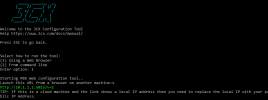
- On this screen, choose option 1
1682418600953.png

Go to http://[local ip]:5015

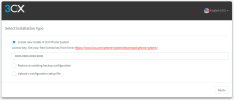
Choose “Restore an existing backup config”.
1682418772764.png

When is done, execute again “Firewall Checker”.
He has NO reason not to succeed.

I promise you won't regret it!
If this does not go as expected, close the new VM and turn on the 3CX Windows VM
But there's no reason why it wouldn't work if you follow the recommendation.

If you have arguments for not installing 3CX on Linux, I am ready to refute them :)
 
Hi,

So far I'm actually very happy with my Windows installation except for this problem now of course. We have had it on the Windows version since version 15.
We plan to run 3cx in the cloud in the future anyway, but until then I don't really want to do an OS change unless it's absolutely necessary or as a last straw.
I will provide you with the backup sizes, but would also like to know where exactly the update-relevant logs are so that one can troubleshoot. I think it is a small thing that I have overlooked. Like when the call logs were big and it took a long time.

Backup size is 1.45 GB
 
Are Windows updates all done ?
How many vCPUs have you reserved for the VM ?
How much Go RAM have you reserved for the VM ?
 
How many vCPUs have you reserved for the VM ?
How much Go RAM have you reserved for the VM ?
8 vCPUs and 12 GB RAM
i tried the update again and after i did not see any more action in resource manager i did restart the server. only after the restart i got a mail with update failed and some logs which i will attach here..i dont see anything which could show me the problem in the attached logs
 

Attachments

It doesn't give any information to help you.
C:\ProgramData\3CX\Instance1\Data\Logs\Update.log
This should provide more information.


Normally you should be able to see the traces in real time during the update process, via this command submitted in powershell ;
Get-Content "C:\ProgramData\3CX\Instance1\Data\Logs\Update.log" -Wait -Tail 30

Share the results.


You know it would be much faster for you to migrate to Linux ?
Although you have plans to migrate to the cloud, you'll spend an incredible amount of time trying to figure out what's on Windows while Linux. It wouldn't even take you 30 minutes to migrate to Linux.
 
finally i got around to migrate it to linux und it works - i dont regret it, yet ;P
restore of the backup took about 35 minutes, but if you do it via the command line it shows you the percentage, which is very nice, because i didn't see it if i do it via the web configurator

its not my first linux machine, but this one was already on windows so i never bothered to do an OS change
 
Status
Not open for further replies.

Forum statistics

Threads
111,974
Messages
590,081
Members
164,899
Latest member
mazet