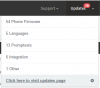
Update Select All Missing ** [3CX UPDATE REQUIRED]

Status
Not open for further replies.

ncrollo

Joined
Jun 19, 2015
Messages
14
Reaction score
0
Some subsets have a "select all" checkbox but others like Phone Firmware and Promptsets can only be selected 1 at a time.

I'd like to have an option to also install ALL subsets and have an option to check for updates / download / install automatically on a schedule similar to windows updates.

If you could create multiple rules so I could have promptsets check for updates weekly and automatically install and then have firmware and system updates download and send email notification that there are pending updates. This would rock
 
Re: Update Select All Missing

I had over 80 updates due yesterday, however today they have all disappeared...

It might have a hidden auto-update schedule that I've not found yet.

There is no longer a settings page once it has been fully updated. :-/
 
Re: Update Select All Missing

supplenta said:
I had over 80 updates due yesterday, however today they have all disappeared...

It might have a hidden auto-update schedule that I've not found yet.

There is no longer a settings page once it has been fully updated. :-/

I am not aware of any auto-updater running in the background. I would suggest trying with a different browser to see if you also see the "Settings" option on the navigation menu again. If this works though, let us know what browser you were using so we can also check it.
 
Re: Update Select All Missing

We are working on this - Select all is disabled in some places because it is unlikely that you have all phones in your network that we provide updates for..
We are checking on how to make updates set as ignored..
For final version. For now check the updates and record the number of updates you have remaining.. Example 71
If you see that next morning you have 72 it means that something was added.

We will definitely improve this..
 
Re: Update Select All Missing

NickD_3CX said:
supplenta said:
I had over 80 updates due yesterday, however today they have all disappeared...

It might have a hidden auto-update schedule that I've not found yet.

There is no longer a settings page once it has been fully updated. :-/

I am not aware of any auto-updater running in the background. I would suggest trying with a different browser to see if you also see the "Settings" option on the navigation menu again. If this works though, let us know what browser you were using so we can also check it.

Interestingly it is IE11 that it does not show in. Chrome and Edge display 78 updates.

IE11 is completely blank and it tells me my system is completely up to date.
 

Attachments

  • chrome.PNG
    chrome.PNG
    9.5 KB · Views: 723
  • ie11.PNG
    ie11.PNG
    3.1 KB · Views: 723
You need to use Chrome, Firefox or EDGE. (And EDGE also has some minor issues but we are working on them)

You need to support our interface with a browser which receives latest technology updates. EDGE is the IE Replacement. We will implement user agent restrictions later in the interface.. so when you try with IE it will give you unsupported browser.
If you see something wrong caused by IE, don't bother reporting it..
 
Status
Not open for further replies.

Forum statistics

Threads
111,845
Messages
589,341
Members
164,681
Latest member
JV J