Upgrade from V12 to V18

Status
Not open for further replies.

Rory_SSG

Bronze Partner
Basic Certified
Joined
Jul 22, 2020
Messages
3
Reaction score
0
I have a client with a very old V12 install hosted on a windows 2008 R2 server. I have been speaking with them for some time about moving off the old server and upgrading to V18.

Yesterday the server failed and will not come back up.

I am aware that i need to upgrade V12 to V14, V14 to V15.5, V15.5 to V16, V16 to V18.

I am currently on V14 trying to move to V15.5 but keep getting an error when trying to upload the backup "unable to connect to 3cx license server, please check your network connection and try again."

I assume this is due to the old license server no longer existing but as a result am stuck.

We have ensured the DNS is set to 8.8.8.8 and 8.8.4.4 as this has been discussed in previous posts but to no success.

Has anyone else experienced this and is there a work around?
 
Hi!

Unfortunately it is not possible anymore to install and activate a V15.5 and you cannot directly restore a V14 backup onto a V18 installation.

The options you have right now are:
  • Rebuild the system from scratch
or
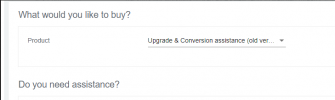
  • Log into customer.3cx.com and switch to the Old Portal and purchase the "Upgrade & Conversion assistance". Through this our support team may be able to help you and provide a working backup for you that can be restored onto a V18 installation.
1649852799451.png
 
  • Like
Reactions: Evolute IT
Hi NickD - we have a similar issue for a legacy client who is now ready for an upgrade.

If we have a working copy of 3CX 15.5. Can we restore a back-up from another instance so it upgrades from the version 14 back-up to the version 15.5 version. Then back-up and migrate directly to version 18? I believe that 15.5 to 18 is supported.

Please confirm your thoughts on this. Thanks.
 
@epcom

15.5 to v18 is indeed supported, but to upgrade from v14 to v15.5 you need to restore the file during installation as opposed to restoring it to an already running system as you have. Now since the v15.5 installation will fail, I'm afraid this upgrade path will not be possible for your case.
 
@ChrisC_3CX

Thanks for the follow-up on this. I appreciate it. Is there any tool that can be made available for partners or command line method on the 3CX Version 15.5 Instance we are running to "force" the upgrade /restoration or clear the current DB out and enable the restoration of the V14 back-up we have. I understand certain pieces have been shut down and we are 100% in favor of getting everyone to V18.

However, certain clients have compliance restrictions or other internal issues / limitations that prevent version to version movement easily.

We won't be the only partner that will get stuck here and a complete redeployment of a system with 2,500 extensions is not a going to work. I think ensuring the upgrade path of any version to the latest releases should continue to be maintained at some level and I'm sure other partners feel similar. Keep me posted on your thoughts - thanks.
 
@ChrisC_3CX

Thanks for the follow-up on this. I appreciate it. Is there any tool that can be made available for partners or command line method on the 3CX Version 15.5 Instance we are running to "force" the upgrade /restoration or clear the current DB out and enable the restoration of the V14 back-up we have. I understand certain pieces have been shut down and we are 100% in favor of getting everyone to V18.

However, certain clients have compliance restrictions or other internal issues / limitations that prevent version to version movement easily.

We won't be the only partner that will get stuck here and a complete redeployment of a system with 2,500 extensions is not a going to work. I think ensuring the upgrade path of any version to the latest releases should continue to be maintained at some level and I'm sure other partners feel similar. Keep me posted on your thoughts - thanks.
Up until 1-2 months ago, yes you could have done it yourself, unfortunately now though there is no way I am aware of that you can do it yourself.

The only way would be with the "upgrade assistance" option so our support team can apply "magic sauce" and get your backup up to V18.
 
Status
Not open for further replies.

Forum statistics

Threads
111,974
Messages
590,083
Members
164,900
Latest member
Silent_Guru