Upgraded to V20, cannot login anymore

Status
Not open for further replies.

houseofdreams

Free User
Joined
Feb 28, 2024
Messages
14
Reaction score
2
I was running V18, got the email I needed to upgrade to V20 before july, so I did (trough the command line, because the web version didn't work)

Upgrade was successful according to the upgrade script. Now I'm trying to login (internal ip address 10.10.100.100:5000) I get a similar login screen with a username /password, but when I use my "old" credentials that I used to acces the admin panel, I first got "username / password incorrect" a few times, now I'm getting "Ip blacklisted"

So I'm now forced to try to login from another internal machine, but this has no use to keep trying, if I'm clearly usin the wrong credentials? Again, the old credentials (admin/*********) are saved in Google Chrome, so the are correct to access the admin section..

What am I doing wrong?
 
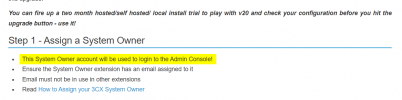
Login with a system owner. The "root admin" is gone and cannot be used anymore in v20.
 
I did a full backup before upgrading, can I find the system owner email address in that backup? I allready tried 1 email account & password, from another machine, but still get the username/password error... I have no idea what account to use

Really starting to regret updating....

I do still got SSH access trough "root/*********" so if that's any help to get access to my install again?
 
You wouldn't have been able to upgrade if a system owner wasn't set, so there must be one.

The only way is extract the backup zip file, open the XML and search for "owner". Maybe you'll find a reference to the user.
 
  • Like
Reactions: PaulC_3CX
Tried both iterations of usernames (email address) and password that I could find in tha XML, nothing works, second computer in the house on blacklist...

Getting worked up now...

Is it possible (if you got the time off course) to check in your own install if the correct login combination is available in the XML file? Otherwise I'm just going to run out of computers to try it with
 
Tried both iterations of usernames (email address) and password that I could find in tha XML, nothing works, second computer in the house on blacklist...

Getting worked up now...

Is it possible (if you got the time off course) to check in your own install if the correct login combination is available in the XML file? Otherwise I'm just going to run out of computers to try it with
If you know the email of the system owner, and it is unique in the system, you can try using the Forgot Password link. Enter the address and you should get an email from the system.

If the user's email isn't unique in the system, then the email won't be sent.
 
The sending of emails, is counting on the fact, that this was setup correctly before the upgrade... As this is a locally installed system on a VM, and luck will tell, that we just had to switch email providers, this wasn't updated yet, so I don't think emails will be coming from the 3CX system anyway...
 
The sending of emails, is counting on the fact, that this was setup correctly before the upgrade... As this is a locally installed system on a VM, and luck will tell, that we just had to switch email providers, this wasn't updated yet, so I don't think emails will be coming from the 3CX system anyway...
If you're using the 3CX SMTP, it's not an issue.

Otherwise, you're in a bad place. I would reinstall a clean v18 from your latest v18 backup.
 
Strange why there isn't a way to edit some files trough SSH, as I do still have access there.
 
Sure you are using the right login page and not the old management login (which is gone in v20)?

eg 123.on3cx.uk/#/login

and https Port and login with number and passwort of system owner
 
Sure you are using the right login page and not the old management login (which is gone in v20)?

eg 123.on3cx.uk/#/login

and https Port and login with number and passwort of system owner
I'm accessing from my internal IP 10.10.10.100:5000 so I'm guessing that's wrong to begin with?

If I try to visit the FQDN that's in the 3CX online portal under "my systems", then I just get the main welcome page of our internal webserver, no 3CX login screen
 
oh, then it is not configured right for use of v20 i think. There was a checklist before upgrading to v20. Split DNS must be functional. I dont know if it is still usable with local IP Address.

Maybe the best way is to reinstall 3cx with v18 an use the last v18 backup. Or if it is a VM maybe you can simply restore last VM backup.
 
Installed new VM with V18, upgraded it to the latest V18 version (same as my backup) and restored the backup. So far so good, all settings are there as they were.

Now going to try shutting down the original (updated to V20 version VM) and re-assigning the IP of the "new" V18 to the IP of the old...

Hoping this works in getting it at least back up and running again with V18. Then, before trying to upgrade again, I will have to do some research into Split DNS.

Maybe someone allready knows the "simple" way to do this on PFSense?
 
Last edited:
You need to find out who your system owner account is which is normally the user assigned to line 000. Basically sign into user 000 as normal as a "user" not as an admin. there is a new admin tab when this user logs in.

Easiest way to not get blacklisted is to try forgot password with a couple emails!
 
You need to find out who your system owner account is which is normally the user assigned to line 000. Basically sign into user 000 as normal as a "user" not as an admin. there is a new admin tab when this user logs in.

Easiest way to not get blacklisted is to try forgot password with a couple emails!

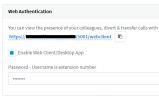
I didn't see the requirement to set a webclient password before upgrading to V20, did set a system owner, as this is mandatory before being able to upgrade, but I have no idea what the default web client password is for this system owner user.

Looked trough the XML backup file over and over, a lot of info, but hard to find what i need here
 
I didn't see the requirement to set a webclient password before upgrading to V20, did set a system owner, as this is mandatory before being able to upgrade, but I have no idea what the default web client password is for this system owner user.

Looked trough the XML backup file over and over, a lot of info, but hard to find what i need here
1709193303603.png
What do you think how you login without a password?
 
  • Like
Reactions: N_G
Yeah I get it now... No need to keep rubbin my face in it. If they require you to explicitly set a system owner to update to V20, they also could explicitly require you to set and remember this username / password combo, as the old way of logging in is going obsolete?
 
Yeah I get it now... No need to keep rubbin my face in it. If they require you to explicitly set a system owner to update to V20, they also could explicitly require you to set and remember this username / password combo, as the old way of logging in is going obsolete?
I am not sure how to make it more clear... You need this account to manage the 3cx. If you dont know any login credentials you cant manage your 3cx. The old Management Console is obsolete.
 
Username is the email address... if you followed the faq than the system owner has an uniqe email address and you can reset the password.
 
  • Like
Reactions: N_G
I assume this password below is the one I need? But this one wasn't set by me (yet) as I didn't need the webclient to access the admin panel. But what is this default value behind the "dots" as there is no eye icon at the back.

Or is it another password, set at another location for this system owner user?

1709194152512.png
 
Status
Not open for further replies.

Forum statistics

Threads
112,328
Messages
591,905
Members
165,483
Latest member
AshleyStokes