Solved Upgrading from v16 to 18 ip issue

Status
Not open for further replies.

steinpag

Customer
Basic Certified
Joined
Mar 31, 2021
Messages
27
Reaction score
0
Hi,

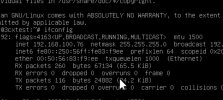
when I do the upgrade the IP address changes, it is now going to dhcp server and getting an IP address using the ipv6 MAC address instead of the ipv4

before the upgrade it was 192.168.100.72 after the upgrade 192.168.100.76

 

Attachments

  • 36AA69C2-2688-492B-AAEE-10C242B7FE54.jpeg
    36AA69C2-2688-492B-AAEE-10C242B7FE54.jpeg
    205.5 KB · Views: 17
  • BE880873-908D-4E5D-A16E-DFB4BCA7C5AF.jpeg
    BE880873-908D-4E5D-A16E-DFB4BCA7C5AF.jpeg
    255.7 KB · Views: 16
You shouldnt be using DHCP at all for the 3CX - Why arent you statically assigning an IP to the machine?
 
  • Like
Reactions: Evolute IT
from memory it didn’t ask for a static IP when installing from the 3cx iso
 
from memory it didn’t ask for a static IP when installing from the 3cx iso
That's because it gets one from DHCP.

When you get to the first page press ESC and then choose to manually set it up.

Otherwise, keep your eyes peeled during set up and it says something like "getting dhcp...." at this point press ESC or.... Remove network adapter and wait for it to say it cant find a connection, then connect it back up after choosing manual set up.
 
If so what are my options now? Reinstall to a new machine and perform a restore from backup?
 
If so what are my options now? Reinstall to a new machine and perform a restore from backup?
Just follow the settings in the link provided above to configure static IP, reboot then from the MGMT console correct the network settings with a click.

Otherwise, yeah.
 
Thanks everyone
 
Out of curiosity.. this all worked, but the email with internal address is showing the old IP address so when checking the app on my phone or the welcome email it shows the wrong ip address for inside the office

before the upgrade it showed a url not op address
 
Last edited:
Out of curiosity.. this all worked, but the email with internal address is showing the old IP address so when checking the app on my phone or the welcome email it shows the wrong ip address for inside the office

before the upgrade it showed a url not op address
If you go to "Settings >> Network" do you now see the correct local IP?

Did you resend new welcome emails to reprovision the devices? Is it the new welcome emails that still show the old IP?
 
All sorted thank you
 
Status
Not open for further replies.

Forum statistics

Threads
111,974
Messages
590,081
Members
164,899
Latest member
mazet