Upload backup file to hosted 3CX

Status
Not open for further replies.

pjng1

Bronze Partner
Basic Certified
Joined
Dec 5, 2022
Messages
13
Reaction score
0
I must be a slow learner, but I can't figure out how to upload a backup to hosted 3CX. There is no option to upload a backup file within 3CX itself, there was no option to restore from a backup during provisioning, and I don't believe there is an inbound FTP option for 3CX hosted. Umm... help?
 
After the installation is complete, you may navigate under Back&Restore option, set the location to an FTP and restore your backup:
1696228977967.png
 
I must be a slow learner, but I can't figure out how to upload a backup to hosted 3CX. There is no option to upload a backup file within 3CX itself, there was no option to restore from a backup during provisioning, and I don't believe there is an inbound FTP option for 3CX hosted. Umm... help?
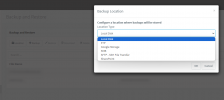
There's no "upload backup" option.
The solution is to host the backup on one of the supports and configure 3CX to work with that support.

As @TheodorosG_3CX suggests.

You can use a temporary service like:

https://sftpcloud.io/tools/free-ftp-server
Before use public service; Ask yourself what would be the worst-case scenario if your backup were leaked.
1GB instant use without subscription.
Proceed at your own risk.
If you use this service, be aware that it has nothing to do with 3CX.

I use it and it works well for me, but trust your own risk assessment, not mine.
 
OK thanks guys - it seems needlessly complicated leaving out an Upload option when that is the first step to take after provisioning a new server.
 
For the 3CX Hosted installations you do not have access to the machine so you cannot SSH to the local folder.
In this case you need to setup a remote location in order to restore your backup.
 
  • Like
Reactions: Guillaume Bourgeois
Status
Not open for further replies.

Forum statistics

Threads
111,974
Messages
590,081
Members
164,899
Latest member
mazet