- Joined
- Feb 26, 2020
- Messages
- 9
- Reaction score
- 4
Hi everyone,
I am dealing with a very frustrating situation. Microsoft has been engaged but they haven't been much help with the issue. I will *try* to make this as brief as possible without leaving out important details!
To save anyone that can maybe answer one question from reading through this whole post, let me pose this first:
Is there a way to provision either some element on the 3CX or a Policy in Teams that would allow calls to successfully pass via Direct Routing when the caller is NOT an actual User synced from Teams to 3CX (e.g. one of Microsoft's generic Conference Bridge numbers)?
Further Details~
Direct Routing for 1:1 calls made via Teams work perfectly every time, for users that are synced from MS Teams to 3CX. The call comes through Direct Routing and connects to 3CX without issue. Ok, now, if the user has a Microsoft Audio Conferencing license (either of the two main varieties), which is needed to get a dial-in phone number for Teams Meeting Invitations), when the user tries to adds a third party to a 1:1 call, that call leg goes out Microsoft's "Calling Plan", NOT via Direct Routing like the initial call does. You would never know it unless you're staring at the Active Calls screen while the three-way call is taking place. Nonetheless, this is how it works. So, with a goal to maintain that all voice calls, including ad-hoc/three-way calls use direct routing, I found the following Microsoft article: On-network Conferencing for Audio Conferencing
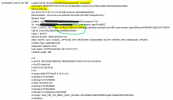
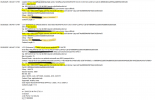
I followed the steps outlined in the article to create a new 'Online Audio Conferencing Routing Policy' within Teams, and assigned to a Users Teams account. Once that was done, when adding a third party to a 1:1 call, it indeed no longer goes out through Microsoft's Calling Plan! However, the call is declined when it hits the 3CX, with "499: Caller is forbidden" and "603 Decline" errors. Attached are two screenshots from the 3CX Activity Log, one of the initial call out that is successful, and the other of the call to the third-party that fails. You can see in the successful one, the "From" field correctly shows the users DID;extension number, exactly as it appears in Teams, but on the second call, the "From" is one of Microsoft's generic Conference Bridge numbers, and I'm assuming the rejection is because 3CX doesn't see that as a valid user/number. So, IF that is accurate reason, does any one have any ideas on how to provision 3CX to accept calls from Teams on a phone number not belonging to an actual user account? Would there be a way perhaps by adding another rule to the automatically-generated "3CX Dial Plan" within Teams? I tried reformatting Outbound (and Inbound) Caller ID via the SIP trunk on 3CX to replace the Microsoft number entirely with a DID connected to the SIP trunk, but this did not work (I made sure the OriginatorCallerID value was set in the trunk as well).
Any help or guidance would be extremely appreciated. Note that these tests were all done in our in-house environment, but the request for this to function as I've described is from one of our end-clients, a VERY large accounting firm that I am really trying to find a way to accommodate this request from them. Logically, it should be possible, but I've run out of ideas and have found no definitive answers online or from Microsoft.
Thank you all in advance!
I am dealing with a very frustrating situation. Microsoft has been engaged but they haven't been much help with the issue. I will *try* to make this as brief as possible without leaving out important details!
To save anyone that can maybe answer one question from reading through this whole post, let me pose this first:
Is there a way to provision either some element on the 3CX or a Policy in Teams that would allow calls to successfully pass via Direct Routing when the caller is NOT an actual User synced from Teams to 3CX (e.g. one of Microsoft's generic Conference Bridge numbers)?
Further Details~
Direct Routing for 1:1 calls made via Teams work perfectly every time, for users that are synced from MS Teams to 3CX. The call comes through Direct Routing and connects to 3CX without issue. Ok, now, if the user has a Microsoft Audio Conferencing license (either of the two main varieties), which is needed to get a dial-in phone number for Teams Meeting Invitations), when the user tries to adds a third party to a 1:1 call, that call leg goes out Microsoft's "Calling Plan", NOT via Direct Routing like the initial call does. You would never know it unless you're staring at the Active Calls screen while the three-way call is taking place. Nonetheless, this is how it works. So, with a goal to maintain that all voice calls, including ad-hoc/three-way calls use direct routing, I found the following Microsoft article: On-network Conferencing for Audio Conferencing
I followed the steps outlined in the article to create a new 'Online Audio Conferencing Routing Policy' within Teams, and assigned to a Users Teams account. Once that was done, when adding a third party to a 1:1 call, it indeed no longer goes out through Microsoft's Calling Plan! However, the call is declined when it hits the 3CX, with "499: Caller is forbidden" and "603 Decline" errors. Attached are two screenshots from the 3CX Activity Log, one of the initial call out that is successful, and the other of the call to the third-party that fails. You can see in the successful one, the "From" field correctly shows the users DID;extension number, exactly as it appears in Teams, but on the second call, the "From" is one of Microsoft's generic Conference Bridge numbers, and I'm assuming the rejection is because 3CX doesn't see that as a valid user/number. So, IF that is accurate reason, does any one have any ideas on how to provision 3CX to accept calls from Teams on a phone number not belonging to an actual user account? Would there be a way perhaps by adding another rule to the automatically-generated "3CX Dial Plan" within Teams? I tried reformatting Outbound (and Inbound) Caller ID via the SIP trunk on 3CX to replace the Microsoft number entirely with a DID connected to the SIP trunk, but this did not work (I made sure the OriginatorCallerID value was set in the trunk as well).
Any help or guidance would be extremely appreciated. Note that these tests were all done in our in-house environment, but the request for this to function as I've described is from one of our end-clients, a VERY large accounting firm that I am really trying to find a way to accommodate this request from them. Logically, it should be possible, but I've run out of ideas and have found no definitive answers online or from Microsoft.
Thank you all in advance!