- Joined
- Feb 10, 2025
- Messages
- 5
- Reaction score
- 0
Hi All.
Looking for some help again.
3CX SMB Pro Hosted
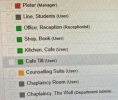
Somehow, my users have managed to set all the user roles to manager or below. This means that no one can now view call routes, sip trunks etc.
Is there a way to set up a new user as the owner of the account?
I imagine, when there has been staff turnaround, somene thought that the new persons postion is manager, so set the user rights to that whitout know exactly what it means.
Any help appreciated. Otherwise, I will have to make a whole new system PBX instance.
Thanks in advance
Looking for some help again.
3CX SMB Pro Hosted
Somehow, my users have managed to set all the user roles to manager or below. This means that no one can now view call routes, sip trunks etc.
Is there a way to set up a new user as the owner of the account?
I imagine, when there has been staff turnaround, somene thought that the new persons postion is manager, so set the user rights to that whitout know exactly what it means.
Any help appreciated. Otherwise, I will have to make a whole new system PBX instance.
Thanks in advance