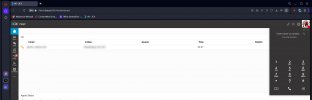
Users cannot pick up calls from Web Client

FuTech-Nel

Bronze Partner
Advanced Certified
Joined
May 25, 2020
Messages
82
Reaction score
3
I upgraded my office to V20 last week, and two users cannot pick up calls from the web client.

One user uses the Chrome v129.0.6668.101, and the other uses Firefox v133.0.2.

They both are set to use the browser as the medium for calling.

The Chrome user is set as a manager role, and the Firefox user is set as a System Admin.
 
The option is greyed out and not able to answer the call?
 
The option is greyed out and not able to answer the call?
No, when a call comes in (into the phone systems in general or a direct call to their extensions), the dialer does not allow them to answer (1st Screenshot), and if they are looking at the panel, they cannot right-click on the call to pick it up (2nd screenshot).2024-10-15_09-28-25.jpgcall-popup-dialer-manually-selected.jpg
 
You need to enable notifications for the Web Client. Click the notification icon on the upper left corner.
 
Yes as @edossantos_sipcaller mentioned you need the notifications to be enabled on your browser.
Also check this with another browser(currently you are using Opera) with notifications enabled and try without the VPN.
 

Members Online Now

Forum statistics

Threads
111,832
Messages
589,282
Members
164,662
Latest member
DejanMDS