Users connected to W80DM DECT sometimes have no audio

LxLiberty

Gold Partner
Advanced Certified
Joined
Feb 13, 2025
Messages
13
Reaction score
3
Hi, first post here.

Hosted by 3CX V20.0 U4

We have 7 W59R handsets connected to a W80DM master DECT base with 3 other W80B's.

Every other day, they will get a call where they have no audio. This issue also seems to happen more often when it's an internal call.

All base stations have been rebooted.

I wanted to record a packet capture to see if I could see what's going on, but since it can happen once every 24 hours, I don't think I can leave the packet capture running directly in 3CX, and when I do it from a local virtual machine on the network, I don't capture the VOIP packets.
 
Hi,

  • The DM and Bases need to be on the same LAN segment as the PBX
  • You need to use an SBC if the PBX is remote. When the PBX is remote with the base over STUN you may face audio issues like you described.
  • The firmware should also be confirmed to be V103.85.0.26 for both DM and Bases.
Which way is yours set up?
 
Hi John, thank you for your answer.

  • The DM and Bases need to be on the same LAN segment as the PBX
This instance is hosted by 3CX, so not on the same LAN
  • You need to use an SBC if the PBX is remote. When the PBX is remote with the base over STUN you may face audio issues like you described.
There is an SBC running version 18.1.36 and the DM is registered to it
  • The firmware should also be confirmed to be V103.85.0.26 for both DM and Bases.
DM and 3 multi-cell bases are running 103.85.0.26

Let me know if there are other settings / configurations iI should check.
 
That pretty much covers it. I would recommend upgrading your SBC though to V20, as the old one is reaching EOL and there were a few cases where audio could have issues. Best rule it out, upgrade instructions here: https://www.3cx.com/blog/news/sbc-eol-upgrade/
 
Sounds good, thank you for the doc.

I will upgrade and keep monitoring.
 
  • Like
Reactions: JohnS_3CX
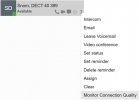
Once you've upgraded your SBC, you can also enable the call quality monitor from your Team page on specific extensions.

The new SBC will collect quality information which can be reviewed in Event Log after each call ends.

This way you don't need to run captures constantly, and can see what happened during specific calls and compare.

1739541399252.png
 
  • Like
Reactions: LxLiberty
Hi @LxLiberty ,

Did you manage to fix this issue by upgrading your SBC to v20?

We are experiencing the same problem. Our SBC is already on v20, but we’re encountering the same issue as you.
 
Hey,

We ended up going onsite and upgrading to the latest firmware for the Master base, 3 slaves and all 8 handsets. Client reported the phones working better than ever before. No audio problems, no "syncronizing please wait" errors and all.
 
  • Like
Reactions: KyriacosS_3CX

Members Online Now

No members online now.

Forum statistics

Threads
111,831
Messages
589,277
Members
164,660
Latest member
RJenkinsROCK