The QR in the welcome email?Cant speak for the auto enroll but you can use any authenticator app to scan the QR code.
How do you GET that QR? It's been enabled without warning!No, to set up 2FA (in v20) you can get a QR code. Otherwise in V18 its SSO with 365 or Google. the QR code youre referring to is to configure the 3cx app.

Dimitris: that's my point: they have never been asked for that via the pop-up to which you refer. So they cannot set it up. I have had to disable 2FA on every user. If I re-enable should they get a pop-up? This is all MacOS - do browser pop-ups need to be enabled? If so that is probably not the best way to handle the 2FA enrollment process.Surely it should be a step in the first login process in the main browser window, similarly to how 365 handles it.Hello @orange2,
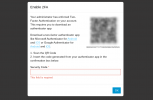
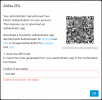
When creating a User, the 2FA is by default enabled. On the login page of the user, once you have entered the credentials it will popup a new window with the QR code to be used. You can download a two factor authenticator app like Microsoft Authenticator or Google Authenticator for iOS or Android. Then you will be required to enter the security code.
View attachment 40742
You can remove the 2FA in the General Tab of the User by unticking the box "Enable 2FA"
Admin >> Users >> select user >> General >> Enable 2FA
Definitely not! And it's happened in both of the 2 new instances that I set up.I must say that i've not seen extensions auto enrolling in to 2FA so I suspect you pressed the 2fa button to turn it on for all users?
Founded in 2005, when VoIP was an emerging technology, 3CX has gone on to establish itself as a global leader in business communications.