Users shows as greyed out in admin portal even though they are logged in through web client

Status
Not open for further replies.

maggah_zw

Gold Partner
Joined
Jun 26, 2024
Messages
5
Reaction score
3
we have just done a bulk provisioning of users in 3cx. However when users receive the email they are able to provision their extension through web client. They will be able to make calls to other extensions and presence will show green. But if you try to call them the call will go to voicemail showing they are not available.
Is there any way for the users to just register with web client and show prescent in admin portal and not greyed out?
Currently if user registers on mobile automatically they appear green and can both receive and call out.
 
If you are referring to using webclients in version 20, then webclients use push, which requires them to be enabled for notifications.

You can do this with either of the 3 options below:

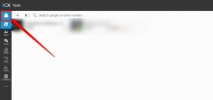
1. Press the bell icon at the top left of the webclients, and allow the notifications that appear unregistered.

2. You can also check from the browser settings by clicking the icon below next to the URL

attachment


3. Try this: If you have missed the bell icon, you can add it manually by pasting the URL below into the browser.

chrome://settings/content/notifications?search=notification
attachment


In the section above, add the URL to the web client. This will then show the users as registered.
 
Thank you. So given my scenario we are provisioning over 500 users is there any other way to get them to register their extensions such that we dont have to go through browser so as to avoid going around on each user to turn on notifications?
 
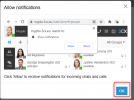
You can tell users that they first open the webclients to enable the notifications using the bell icon in the top right of the webclient page.

1719426898990.png


1719426917021.png

Then Click OK in the resulting popup.
 
Status
Not open for further replies.