Solved Using bogus extensions for Room availability

Status
Not open for further replies.

DavidM84

Free User
Joined
Mar 5, 2022
Messages
96
Reaction score
32
Hi,

We have a few rooms we'd like to quickly see if they are open for meetings or someone is using them.
I thought of creating a bogus extension called "ROOM 1".
It works to a point. It shows up with an AVAILABLE status, but as soon as I change the status to something else (eg: away), it disappears and is now unregistered.

When I set the status to available from "Management Console" it shows available and everyone can see it:
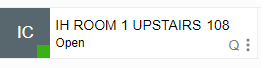
1647741418778.png

but when I change it to "Away" then it disappears, or only shows when "show unregustered extensions":
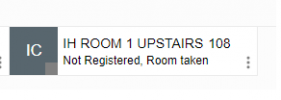
1647741475477.png

Is there a way to circumvent that, and have an extension that doesn't require to be provisioned on an app so no matter its status, anyone can see it with its proper status colors?
 
Hi,

We have a few rooms we'd like to quickly see if they are open for meetings or someone is using them.
I thought of creating a bogus extension called "ROOM 1".
It works to a point. It shows up with an AVAILABLE status, but as soon as I change the status to something else (eg: away), it disappears and is now unregistered.

When I set the status to available from "Management Console" it shows available and everyone can see it:
View attachment 28833

but when I change it to "Away" then it disappears, or only shows when "show unregustered extensions":
View attachment 28835

Is there a way to circumvent that, and have an extension that doesn't require to be provisioned on an app so no matter its status, anyone can see it with its proper status colors?
Are you using "Ring mobile simultaneously" on that extension to trigger it to be fake registered? If so, it will do that since on Away, it's probably not enabled.
 
Are you using "Ring mobile simultaneously" on that extension to trigger it to be fake registered? If so, it will do that since on Away, it's probably not enabled.
Right. The only other status that is enabled, is "LUNCH"
 
If the extension is not actually registered and you're utilizing the "Ring my mobile simultaneously" to keep it registered then I'm afraid that you will not be able to utilize any other profile statuses other than "Available" and "Custom 1(Lunch)".

Note: You can of course utilize the unregistered state, but, as you said, if the 3CX Client does not have "Show unregistered extensions" enabled the extension will not show.

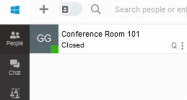
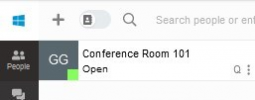
Perhaps you could use the two available statuses mentioned above. The default available status is a slightly darker green than the other so it could probably be used as the closed state:

Closed (Available):
1647863939714.png

Open (Custom 1/Lunch):
1647863953775.png
 
If you sync a user from 365 you can have them show in your people list.
 
Thank you guys, I think it will do :)
 
  • Like
Reactions: ChrisC_3CX
You're very welcome! Feel free to let us know if you need additional information or assistance!
 
  • Like
Reactions: DavidM84
Status
Not open for further replies.

Forum statistics

Threads
111,974
Messages
590,081
Members
164,899
Latest member
mazet