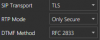
SOLUTION:
We finally got the solution, so thought I'd share it here, since it should be documented somewhere (and I can't see where 3CX has documented it; it's not on the http://www.3cx.com/blog/voip-howto/secure-sip page):
~~~~~~~~~~~~~~~~~~~~~~~~~~~~~~~~~~~~~~~~~~~~~~~~~~~~~~
server setup is as defined at http://www.3cx.com/blog/voip-howto/secure-sip
client setup:
Within 3CXPhone for Windows:
1)navigate to Settings >> Configure >> Advanced >> in the SIP transport Select TLS
2)Settings >> Configure >> and the in office or out of office sections, add :5061 after the IP address.
3) The certificate which was previously generated will have to be imported on the windows machine as well. To do so copy the certificate on your machine and double click open it, click on Install Certificate , select Local Machine, Place all certificates in the following store , click on browse and select, Trusted Root Certification Authorities.
You can provision the softphones to use TLS:
In the 3CX Management Console, make sure that the checkbox "Enable Secure SIP (TLS)" is checked, at Extensions -> the extension -> Other tab. If you do that, the provisioning file you send to clients will not add the :5061 to the IP address, but TLS will be turned on, the PBXSipPort will be changed to 5061, and TLS will work.
~~~~~~~~~~~~~~~~~~~~~~~~~~~~~~~~~~~~~~~~~~~~~~~~~~~~~~
HOWEVER, this does not encrypt the phone calls themselves. TLS is only encrypting the authentication/registration piece. After the call is connected, it's in the clear. To encrypt the phone call, you have to set SRTP to "Always Secure".
It seems like to turn on SRTP via provisioning files (instead of having to do it for every single softphone individually) you have to change the <RTPTransport /> line of the provisioning file to say <RTPTransport>2</RTPTransport> instead. I can't figure out how to do that from the Management Console (you'd think that the "Switch on Secure RTP (SRTP)" option would do this, but it doesn't).
~~~~~~~~~~~~~~~~~~~~~~~~~~~~~~~~~~~~~~~~~~~~~~~~~~~~~~
I also had to figure out how to provision Polycom Soundpoint IP331 phones to use TLS, and here's what I had to add to the Polycom SPIP331 provisioning file:
<!-- TLS Setup -->
<device.sec.TLS
device.sec.TLS.customCaCert1="-----BEGIN CERTIFICATE-----
...long certificate string...
-----END CERTIFICATE-----">
<device.sec.TLS.customCaCert1
device.sec.TLS.customCaCert1.set="1">
</device.sec.TLS.customCaCert1>
and under Registration settings for the phone, I had to change the lines to say this:
<!-- Registration Settings -->
<reg
reg.1.telephony="1"
reg.1.server.1.register="1"
reg.1.srtp.offer="1"
reg.1.server.1.address="%%pbx_ip%%"
reg.1.server.1.port="5061"
reg.1.server.1.transport="TLS"
reg.1.outboundProxy.address="%%pbx_ip%%"
reg.1.outboundProxy.port="5061"
reg.1.outboundProxy.transport="TLS"
Hope this helps someone.
EDIT: In fact I just tried it and checking the "Switch on Secure RTP (SRTP)" checkbox in the Management Console makes no difference at all in the softphone provisioning file that is created. I don't know if it's supposed to: I guess it could be making some other change ( I can't think what, but maybe it's enabling something else, somewhere else). However, it does not configure the 3CXPhones to use SRTP, like I would've thought it would.