


- Joined
- Jan 9, 2014
- Messages
- 5,077
- Reaction score
- 1,096
This post is to help someone in same problem I encountered, stay stuck 2days before solving, so if it can avoid others loosing time .
I got problem with FTP connection not working on some Windows 10 PBXs, of course credentials were the good ones.
Each time got this poor message on PBX machine on backup menu

On FTP SERVER side nothing logged, connection probably never reach the server.
From teamviewer session on one windows PBX, I've done :
This returns me an answer with possible cause as first DNS prefix resolution was IPv6 address.
After a search on Microsoft support, I found a way to properly disable IPV6 DNS resolution in W10 Network IP stack , this keeping IPv6 enabled in NIC settings.(recommended by Microsoft)
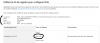
If value does not exist, then create like
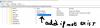
Close registry after adding
Reboot computer
You are done, now DNS resolution returns only IPv4 on PBX and FQDN to FTP server works like a charm. Backup are stored on FTP.
Let me know if it helped
I got problem with FTP connection not working on some Windows 10 PBXs, of course credentials were the good ones.
Each time got this poor message on PBX machine on backup menu
On FTP SERVER side nothing logged, connection probably never reach the server.
From teamviewer session on one windows PBX, I've done :
- Nslookup of my FTP-FQDN
This returns me an answer with possible cause as first DNS prefix resolution was IPv6 address.
After a search on Microsoft support, I found a way to properly disable IPV6 DNS resolution in W10 Network IP stack , this keeping IPv6 enabled in NIC settings.(recommended by Microsoft)
- Opened windows registry (regedit) and searched registry key to add value described here

If value does not exist, then create like
Close registry after adding
Reboot computer
You are done, now DNS resolution returns only IPv4 on PBX and FQDN to FTP server works like a charm. Backup are stored on FTP.
Let me know if it helped


