v18 Audit Log\Multiple Admins

Status
Not open for further replies.

Mike Hammett

Customer
Basic Certified
Joined
May 18, 2018
Messages
254
Reaction score
43
There is some value obtained from having audit logging on a PBX with a single admin account. That feature really flexes its muscles when there are multiple admin accounts.

v18 doesn't yet seem to support multiple admin management console accounts. Any idea when that will be a thing?

I can do it via the Microsoft 365 SSO, which does work. However, it appears that I can only have one organization integrated at a time. If I tie my organization's 365 to a customer for management console access, then that customer can't use 365 integration for user-based functions. Also, it *appears* in initial testing that SSO users don't show up any differently than the regular console account in the audit log.

I can give an extension management console access. There are a variety of rights I can give an extension, even if I make an extension for each of my techs. Are all of the rights I might possibly need as an admin assignable via this method, or is an extension granted all access rights still a lesser admin than the regular console admin?
 
Last edited:
Hi!

I think I understand where the misunderstanding is, so let me try and explain.

When talking about 3CX Management Console access, there are 2 types of users:
  • The Global Admin which you configured a username/password for during the installation of 3CX (think of this as the equivalent to "root" for Linux)
  • All others Users that you can then delegate granular rights to

It is important to also understand another thing. There is only 1 Global Admin account (configured at setup), but you can delegate as many users as you want with granular rights.

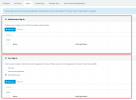
Now, in the SSO tab, you have 2 sections:
1633945195040.png

In the top section, you add what MS365 users you want to be allowed to access the Management Console as the single Global Admin account. To be clear, even if you add multiple M365 users here, they will all be being logged in with the same Global Admin account.

In the bottom section, you delegate who should access the to the Management Console and WebClient, depending on their rights. If in the extension settings of a User, you have granted them Management Console access rights, you add them in this section only and they try to log in with MS365 SSO, they will gain access to the MC, but only with their rights.

TL;DR, If you want to delegate certain management console rights to individual users, you must ONLY add them to the bottom section, not the top one.
If you add users to both sections, they will gain the rights of the highest, which will always be the Global Admin.
Also, if you do it this way, the Audit Log will also show you the actions of each user correctly.
 
  • Like
Reactions: Evolute IT
Thank you. Adding 365 Management console login without multiple users seems like a big missed opportunity. When will we get multiple Global admin users?
 
Thank you. Adding 365 Management console login without multiple users seems like a big missed opportunity. When will we get multiple Global admin users?
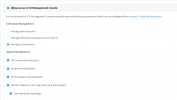
It is not currently on the roadmap as far as I am aware, but if for the individual users, you give them all the rights, they should be able to perform most of the day-to-day tasks without problems.
1633948487466.png

The general advice we give is that the Global Admin account should not be given out to a lot of people, for individual Admins, just grant them all rights and for the few things that they can't do, which should not be a daily thing, ask the Global Admin to do it.
 
  • Like
Reactions: Evolute IT
It is not currently on the roadmap as far as I am aware, but if for the individual users, you give them all the rights, they should be able to perform most of the day-to-day tasks without problems.
View attachment 25048

The general advice we give is that the Global Admin account should not be given out to a lot of people, for individual Admins, just grant them all rights and for the few things that they can't do, which should not be a daily thing, ask the Global Admin to do it.
At this point we do not trust users with management rights of any kind. However, we have multiple sysadmins that may work on a PBX at any given time. Auditing who has done what is an important thing.


Multiply that across a few dozen PBXes and it starts to add up to be a management pain in the butt.
 
  • Like
Reactions: Ian Measures
Status
Not open for further replies.

Forum statistics

Threads
111,976
Messages
590,089
Members
164,904
Latest member
gdstratton