V18 build 450 update and behemoth .tmp file issue

Status
Not open for further replies.

Leo_B

Silver Partner
Basic Certified
Joined
Nov 23, 2020
Messages
104
Reaction score
22
Hello,

At about 3 am, Mar 5 the 3CX system reported it was successfully updated to v18 build 450. 24 hrs later at 3 am, Mar 6 we received 'Harddisk is at or near full capacity' alert. It appeared that 50 GB SSD was 100% utilized because of tremendous 16GB+ .tmp file predictably located in /tmp, and this culprit rendered system totally non-functional. After removal we had to reboot the server because '3CX PhoneSystem Database Server' service kept displaying 'Stopped' status. As the server completed restart, the 3CX system has fully restored its functionality.

The question is, what was the rerason for creation of the mentioned .tmp file and why had it stay intact in /tmp folder?

Thank you in advance! Our 3CX setup details follow below:

3CX Version: Enterprise Annual 18 Update 3 (build 450)
Server OS: Debian 10
Is the 3CX Server Hosted: no
IP Phone Make/Model/Firmware: Yealink T58A v58.86.0.20
Provisioning Method: SBC
Trunk Provider: Vitelity
Has the Firewall Checker passed: YES
Are custom Phone Templates being used: NO
 
What makes you think the temp file had to do with 3CX? What was the file name? File ownership? File date?
 
What makes you think the temp file had to do with 3CX? What was the file name? File ownership? File date?
Hey,

Unfortunately, I was in a hurry trying to recover site's functionality asap, therefore all I have is the names of tmp-files, /tmp/tmpW5gnSH.tmp and /tmp/tmpl4VQ5m.tmp, 2GB+ and 16GB+ ones, both zeroing the free space effectively. The smaller one was created soon after 3 am 03.05, the larger file seems to appear back on 3 am 03.06. No extra details on date and ownership available, sorry.
 
Hmm... well the timing is certainly suspicious for sure. Don't think I've seen any other mentions yet with similar issues. Do post if it crops up again.
 
Do you have some scheduled task to run at 03:00 on 3CX, like Scheduled Backup, or Archiving of Recordings, or maybe an Update check?
 
Do you have some scheduled task to run at 03:00 on 3CX, like Scheduled Backup, or Archiving of Recordings, or maybe an Update check?
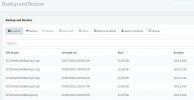
Backup task is scheduled to 2:30 am, and no backup seems to have been created back on Mar 5 and 6. On the other side, automatic updates check appears to be set to 'weekly, Sat 3:00 am - 4:00 am' which clearly hints to Mar 5.
 
Backup task is scheduled to 2:30 am, and no backup seems to have been created back on Mar 5 and 6. On the other side, automatic updates check appears to be set to 'weekly, Sat 3:00 am - 4:00 am' which clearly hints to Mar 5.
So in the past 2-3 days, there hasn't been a backup created even though you have it set to do it "daily @ 02:30"? IF this is the case, then this is where I would suspect the problem.

What backup location have you set? Local Disk, Google Storage, SFTP?
 
So in the past 2-3 days, there hasn't been a backup created even though you have it set to do it "daily @ 02:30"? IF this is the case, then this is where I would suspect the problem.

What backup location have you set? Local Disk, Google Storage, SFTP?
Actually, Google Storage. And just to make things totally clear, here goes Web UI backup 'log' attached:

Backups.JPG
 
OK, this makes sense then.

Indeed before uploading the Backup to Google Bucket, 3CX first "builds" the backup file in /tmp and once the archive is complete, it then uploads it.

If something interrupted the backup at some point, which may in fact have also been the automatic updates, it could be that the TMP file that was left there and never cleaned up is what was causing this.

Seeing that you backup grows to 16GB, I would allow at least 1 hour for it to be made and uploaded, so if you have set the Auto-backup to start at 02:30, I wouldn't set Auto-updates before 04:00 because certain updates need to restart the 3CX system.

Out of curiosity, since you manually deleted this large TMP file, has this happened again?

Also as a side note, if your Backups grow to 16+ GBs, then 50GB SSD is too small, if you factor in the 3CX Software, the verbose logs that you might need to enable at some point, possibly recordings, etc...
I would recommend increasing it at least to double that.
 
Status
Not open for further replies.

Forum statistics

Threads
111,974
Messages
590,083
Members
164,901
Latest member
Silent_Guru