v18 Client - Jabra cannot accept call

Status
Not open for further replies.

HExSM

Forum User
Joined
Feb 18, 2019
Messages
85
Reaction score
11
I have a Jabra Evolve 40 headset which is connected via the Evolve Link to the USB port of my PC. If I get a call, then the Evolve link starts to flash and I click on the green button to accept the call. This is just working on the first call, after I started the 3CX v18 Desktop App. On the second, third, fourth etc. call it does nothing. If I restart the app, then it's working again on the first call.

Settings > Audio/Video > Headset integration is set to "Jabra" and says "Headset ready".

OS: Windows 10 Pro 20H2
3CX Desktop App: 18.3.33
3CX Server: 18.0.1880
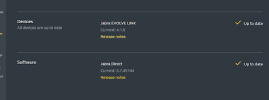
Jabra Direct: 5.6.43171
 
Hi @HExSM,

To confirm, you're opening the Jabra direct software before you're opening the 3CX Desktop App? It shows Ready in the Jabra Direct software as well?
 
Hi @VasilisV_3CX,

yes, Jabra Direct was opened before. But it doesn't matter if I start it before or after the 3CX app was started. In both cases only the first call can be accepted by the Evolve Link. In the Jabra Direct software it shows "Ready" for "3CX Desktop App".
 
Hi,

I also made the update to version 18 but sinds the udate In my Jabra direct I don't see 3cx Desktop App
Before I did had 3Cx desktop phone (that I uninstalled V16 of application of Windows)

Also in the new Desktop app now I don't see:​

Settings > Audio/Video > Headset integration "Jabra option"
You can only chose Sennheiser or none.
Did I miss something to install?
 
We have also problems with the Jabra integration here. We´re running V18 and the new desktop app. Even the desktop app shows that headset is ready we`re unable to pickup or terminate a call using the headset button. Headset models used are Jabra 9470 and Jabra 930. Looks like integration isn`t active at all.
 
Hi @HExSM,

Just done a test with the following:

unnamed.png

And I was able answer with the evolve, place on hold, hang up, and repeat as many times as I'd like.

I'd close all unnecessary apps and try again to see if it's a software interaction issue.
 
I just checked the jabra direct version and reinstalled it with the current version. Now I can answer and terminate calls using the headset. So it seems that reinstallation is the solution.
 
  • Like
Reactions: VasilisV_3CX
EDIT: Reinstallation only temporarily corrected the issue, after a number of calls, @AndiHB mentioned that answering via the HW button no longer works again unless restarting the program.
 
Last edited:
Hi @HExSM,

Have you tried to close all non-essential apps and test to see if after the first call, the rest work with the Evolve link?
 
Hi @VasilisV_3CX,

for me it seems to work now, after I did
  1. uninstall Jabra Direct
  2. delete "%AppData%\Jabra Direct" and "%AppData%\JabraSDK"
  3. install latest Jabra Direct
  4. reboot workstation
 
Hi @HExSM,

That's great to hear. Can you let me know if like @AndiHB, this stopped working after a little while? Perhaps check back with me after testing with 10+ calls and let me know if it's a stable solution.
 
I`ve tried that way, too. Unfortunately it also stops working after a few calls.
 
Is there anything new about this problem?

In the german forum there`s also a thread - https://www.3cx.de/forum/threads/v18-windows-app-jabra-plantronics-integration-fehlt.100392/ serveral others have the same problem with Jabra headsets and the desktop app. Till now there´s no solution and unfortunately no help from 3cx staff.
Are you having the same problem as the OP?
First call works and can be answered using the headset button, but all other calls can't be answered this way?
 
Nearly yes. Its not only the first call but after a few calls the functionality stops working. Restarting the 3CX app and/or the Jabra app solves the problem for a few calls.
I`ve tried some of the solutions (i.e. uninstalling jabra app, removing the folders, reinstalling it, starting the 3cx app manually after the jabra app is started, setting speaker and microphone in the 3cx app to the headset (instead of default). But it remains unstable.
 
Nearly yes. Its not only the first call but after a few calls the functionality stops working. Restarting the 3CX app and/or the Jabra app solves the problem for a few calls.
I`ve tried some of the solutions (i.e. uninstalling jabra app, removing the folders, reinstalling it, starting the 3cx app manually after the jabra app is started, setting speaker and microphone in the 3cx app to the headset (instead of default). But it remains unstable.
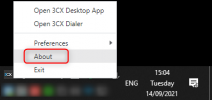
As a first check, could you please tell me what version of the Desktop App you are currently using? You can check this by right-clicking on the icon in the Notification Area and pressing "About".
1631621165055.png
 
Its version 18.3.33 and Jabra version is 5.7.45144
 
After our PM conversation with @AndiHB , it seems that the problems start after trying to answer an incoming call from 'MakeCall' using the integration.

@HExSM
Are your users also using some implementation that they receive incoming calls from 'MakeCall'?
 
@NickD_3CX nope. On our site the Jabra integration seems to work, since reinstalling Jabra Direct (~1 month ago).
 
Status
Not open for further replies.

Forum statistics

Threads
112,025
Messages
590,368
Members
164,978
Latest member
FringeIT-Eric