V18 client no open URL option on connect

Status
Not open for further replies.

dinohead

Customer
Basic Certified
Joined
Apr 2, 2020
Messages
18
Reaction score
1
Hey

I used to use the open url on connection option to pop our CRM open.

I can't find it on the new UI - is it even there? :O
 
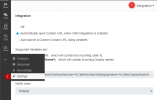
In the new Windows App, it is under Settings --> Integration
1628682364838.png
 
I don't get that. Perhaps my license has been downgraded...assuming it's a pro feature

1628687340724.png
 
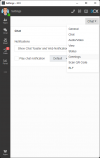
I don't get that. Perhaps my license has been downgraded...assuming it's a pro feature

View attachment 23498
That would certainly be a reason, this option is not available with Standard Licenses.
It was the same in V16 as well.
 
  • Like
Reactions: ChrisC_3CX
That would certainly be a reason, this option is not available with Standard Licenses.
It was the same in V16 as well.
Shouldn't the custom URL option be there anyway? I always thought it was.
 
same problem here, its pro version, crm integration wont open links, at v16 it work properly. in 18 wont
 
@bumblebee

same problem here, its pro version, crm integration wont open links, at v16 it work properly. in 18 wont
The issue in the current thread is that the Integration option does not exist at all which is due to the License Edition.

Does the "Integration" option not exist for you also despite having the appropriate License Edition or does it simply not work for some reason?

If it exists but does not work then it would be a completely different issue, in which case I would recommend starting a new thread so that we can take a look.
 
  • Like
Reactions: Evolute IT
I used to use the open url on connection option to pop our CRM open.
The CRM integration is a Pro/Ent feature. Just went through this with a license downgrade in another thread.

If the CRM contact exists (matching number), 3CX will by default open the URL.
If the person had previously turned off that setting in that browser then it won't open.
If the person uses a different browser or the new Desktop App the option (though hidden) still defaults to open the CRM contact, so it will now open for that browser/app/PC combination.
Once the license is downgraded the setting to turn it off/on for that browser/app/PC combination no longer exists.

I was told the older Windows client will not open "server side" integrations regardless of its setting. I thought I remembered differently but it's been a couple years and I don't have a way to test at the moment.

To stop the popups on a newly-Standard license, export the CRM contacts, delete, and import as regular company contacts.
 
Status
Not open for further replies.

Forum statistics

Threads
112,349
Messages
592,027
Members
165,513
Latest member
megalmazan