• We do not provide troubleshooting help for unsupported phones. Please try with a supported phone.
  • V20 Update 10 Alpha 2 Learn more

V18 Upgrade changed phone type all extensions

Status
Not open for further replies.

JordanRN

Forum User
Joined
Aug 21, 2017
Messages
10
Reaction score
1
Good Afternoon,

We recently completed an upgrade from V16 to V18.

Now all of our provisioned Grandstream phones are showing up as CyberData Emergency Intercom phones instead of our proper models as shown below.

We are having to delete this phone and add back in the GXP2170 with MAC address to get them to provision properly.
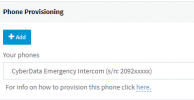
1647282688811.png

Correct Phone Provisioning

1647282704862.png


Anyone had any issues like this
 
Good Afternoon,

We recently completed an upgrade from V16 to V18.

Now all of our provisioned Grandstream phones are showing up as CyberData Emergency Intercom phones instead of our proper models as shown below.

We are having to delete this phone and add back in the GXP2170 with MAC address to get them to provision properly.

View attachment 28697

Correct Phone Provisioning
View attachment 28698


Anyone had any issues like this
Likely you were using a custom template that didn't get re-loaded. Is this a windows installation? You could copy back the template to the same location and restart the nginx service.
 
  • Like
Reactions: JordanRN
This makes sense, I remember the old admin using a custom template because the GXP's were not really supported yet.

Thanks for quick reply.
 
Likely you were using a custom template that didn't get re-loaded. Is this a windows installation? You could copy back the template to the same location and restart the nginx service.
Double checked, the template is in there...

It is a Windows Box and we did a back/restore for the upgrade.
 
Double checked, the template is in there...

It is a Windows Box and we did a back/restore for the upgrade.
then you had a custom template in the regular (non-custom) template folder. Those aren't restored on backup.
 
1. Delete the devices from each extension, press OK to save.

2. Reset each device, and when it appears in the "Phones" page, simply assign it to its extension again.

The Factory reset is important to ensure that there are no leftover settings that may cause issues for your users.

Templates have changed over the years, so you would ideally want to use the latest that comes with V18 Update 3 (as opposed to an older custom template that wasn't receiving any updates/maintenance)
 
Status
Not open for further replies.

Forum statistics

Threads
112,149
Messages
590,964
Members
165,170
Latest member
SupportRock
