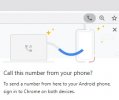
We completed our 3CX v16 to v18 upgrade without issue. We are on desktop #5 for the Windows app installation on our desktops and have run into our first trouble. The install completed successfully without any errors, but when using the click to call feature, the chrome popup appears without a selection to "Pick an app". We've tried reinstalling the Click2Call Extensions and reinstalling the Windows App and the problem still exists. Any ideas? Thanks in advance!
In Windows, open your Default Apps and scroll to the bottom, select 'Choose default apps by protocol' then scroll down to TEL. Select the 3CX Desktop App and reload the page with the number, give it another go. Does it show up now?