


- Joined
- Oct 29, 2020
- Messages
- 12
- Reaction score
- 4
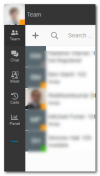
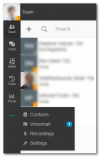
Have just updated our PBX to V18 and am playing with the new Windows app, it's far nicer than the legacy one and generally is a big upgrade. One thing that's confused me is the fact that "Contacts", "Voicemail", "Recordings" and "Settings" are all in an overflow menu on the left rather than just their own menu items. If somebody leaves me a voicemail I can't really tell as the notification badge is hidden behind the menu. The 3 dots turn blue, but that's far from obvious at a glance. Even if I make the window as short as it will go there's still easily enough room for the 4 extra menu items there, so I've no idea why you would want to hide it behind an extra mouse click anyway.
Checking the settings in the app I don't see any way to change this behaviour. Am I mad or is this just a bit nuts?
Checking the settings in the app I don't see any way to change this behaviour. Am I mad or is this just a bit nuts?


