V18 windows desktop app

Status
Not open for further replies.

David_O

Free User
Advanced Certified
Joined
Aug 12, 2021
Messages
48
Reaction score
21
Hello
We have updated to v18 and tryied to make the new windows client working and we d'on't have sound

V16 <=> V16 OK
V16<=> V18 no voice
V18<=> V18 No voice

If some one have an idea ??
 
Hi @David_DLN,

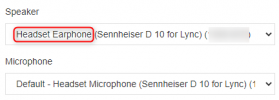
The WebClient in v16 has sound is that correct (I don't mean the Windows App)? If yes, in v18's Desktop App have you ensured that you've selected the correct Speaker and Microphone? Try and select the non-default option and see if that works, as shown below.

1632726673066.png

What speaker / microphone are you using? Does it work with the Windows Client (as opposed to the Desktop Client)?
 
Hi
Yes everything is ok with v16 Windows client
I have tryied senheiser USB heasphones and Logitech same results
 
Hi @David_DLN,

Let's start again, which version of the PBX are you running? Where are you hosting it?

When you said v16 <==> v16 what do you mean? That you tested with another PBX?

Has your firewall checker passed?
 
Pbx is latest v18 hosted on our servers.
When i say v16 <=> v16 ok , it is between 2 v16 Windows app,
No i have not tested another pbx.
And i ll try firewall testing on client tomorrow
 
Hi @David_DLN,

Understood, let me know the results of the firewall checker.
 
Status
Not open for further replies.

Forum statistics

Threads
112,349
Messages
592,027
Members
165,513
Latest member
megalmazan