v20 2FA Invalid Security Code Issues

srane.sushant

Silver Partner
Advanced Certified
Joined
Feb 25, 2020
Messages
78
Reaction score
11
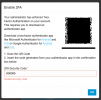
I reseted my company admin password but as MFA is enable its asking me code. I scan QR and entering correct code but still it not accepting.
1751007137400.png

Getting above error. I do not have any other company admin to login to disable this user MFA.
need help to resolve this issue.
 
Hello,

Such errors are generally due to the time being wrong on either the phone or PBX. Can you please check and fix any time errors before trying again?

Best,
KS
 
how to fix time issue ? I only have root access to 3cx as of now
 
1751008534719.png
i checked via root login time is correct on system
 
Hi,

Firstly, let's confirm - time on phone is fine?

On your server type:
# date

This should show you what time the server things it is.

You can update this by running:

# date -s TIMESTRING
 
PABX is UAE and I am using MFA authenticator from India but previously it was woring
 
The time zone difference should not matter.

If you check date/time on both, are the minutes and seconds synchronised?
 
sorry not getting you? what do you mean by both ?

I am using google authenticator also try Microsoft Authenticator still getting same error
 
I scan QR and entering correct code
And just a verification, you deleted the old 2FA entry from your app for this PBX and you are registering it again via the QR, entering the code from the new registration?
 
And just a verification, you deleted the old 2FA entry from your app for this PBX and you are registering it again via the QR, entering the code from the new registration?
This PABX is access via multiple admin so not sure if any other engineer has set himself MFA on there device.
 
The only common cause for 2FA to fail is wrong time on one of the devices, it seems to be the PBX.

Please run:
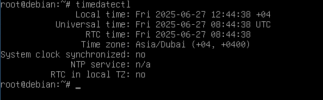
timedatectl
and paste the output.
 
The only common cause for 2FA to fail is wrong time on one of the devices, it seems to be the PBX.

Please run:
timedatectl
and paste the output.
1751014355694.png
 
OK, no ntp or other tyme sync service is running.

You will need to install/start ntp so the server can restore correct time for itself automatically.
Check if installed:

Bash:
apt policy ntp

If it shows
Installed: (none)
then do:

Bash:
apt-get update
apt-get install ntp

do:
Bash:
timedatectl
to see if it's running.
If not you can start the service by doing:
Bash:
systemctl enable ntp.service
systemctl restart ntp.service

You can find more details here:
https://reintech.io/blog/configuring-ntp-client-debian-12
 
  • Like
Reactions: Alejandro_3CX

Forum statistics

Threads
111,974
Messages
590,081
Members
164,899
Latest member
mazet