v20 External Webclient Audio issue

Bergwerk IT

Silver Partner
Joined
Dec 18, 2020
Messages
17
Reaction score
0
Seeing as how we cannot open a ticket in the portal even though we have a working Enterprise License I will post here and hope someone, anyone, can shed a light on what is going on now.

After being forced to upgrade to v20, losing STUN support (even if it was never officially supported it still worked) we now no longer have audio when making calls using the webclient when outside our LAN/VPN. If the App is used externally in the same net as the webclient it works as it should.

If the webclient is on our LAN/VPN then call audio works as it should. All IP phones work as usual across the SBC. All Firewall tests pass and have also checked the nftable entries per hand and all is as it should be (otherwise the app wouldn't work either). This is an issue with all browsers we have tried so far.

Hoping to get this cleared up soon.

Charles Williams
 
The web clients use ports 10500-10999 for their audio. Which ports do you have forwarded on the firewall?

The mobile apps use the tunnel to connect. So you need to concentrate your efforts on the firewall configuration.

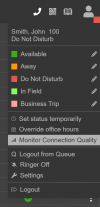
You can activate the connection monitoring tool to see the information of the call to start troubleshooting.

1731940288529.png

You will see the resulting report in the event log after the call is completed.
 
  • Like
Reactions: bitn2
our nftables looks to be correct.

Code:
table inet filter {
    chain input {
        type filter hook input priority filter; policy drop;
        jump phonesystem
        iifname "lo" accept comment "Accept any localhost traffic"
        ct state { established, related } accept comment "Accept traffic originated from us"
        ip daddr 224.0.1.75 counter packets 0 bytes 0 accept comment "Accept SIP Multicast"
        ct state invalid drop comment "Drop invalid connections"
        tcp dport 113 reject comment "Reject AUTH to make it fail fast"
        tcp dport { 80, 443, 5000, 5001, 5015, 5060, 5061, 5062, 5090 } ct state new counter packets 45374 bytes 2382308 accept comment "Accept 3CX PhoneSystem TCP ports"
        udp dport { 69, 5060, 5090, 7000-10999 } counter packets 3 bytes 138 accept comment "Accept 3CX PhoneSystem UDP ports"
        udp dport { 137, 138 } counter packets 202 bytes 34027 accept comment "Accept NetBIOS"
        tcp dport { 139, 445 } counter packets 83 bytes 3936 accept comment "Accept TCP/IP MS Networking"
        tcp dport 22 ct state new limit rate 15/minute accept comment "Avoid brute force on SSH"
        ip protocol icmp icmp type { echo-reply, destination-unreachable, time-exceeded, parameter-problem } accept comment "Accept ICMP"
        ip protocol icmp icmp type echo-request limit rate 1/second accept comment "Accept max 1 ping per second"
        icmpv6 type { destination-unreachable, time-exceeded, parameter-problem, echo-request, nd-router-advert, nd-neighbor-solicit, nd-neighbor-advert } accept comment "Accept ICMPv6"
        ip6 nexthdr ipv6-icmp icmpv6 type echo-request limit rate 1/second accept comment "Accept max 1 ping per second"
        fib daddr type broadcast drop comment "Drop other broadcast"
        fib daddr type multicast drop comment "Drop other multicast"
        fib daddr type anycast drop comment "Drop other anycast"
        ip daddr 224.0.0.0/4 drop comment "Drop DVMRP"
    }

    chain forward {
        type filter hook forward priority filter; policy drop;
    }

    chain output {
        type filter hook output priority filter; policy accept;
    }

    chain phonesystem {
        ip daddr 224.0.1.75 counter packets 0 bytes 0 accept
        tcp dport { 80, 443, 5060, 5061, 5062, 5090 } ct state new counter packets 21622 bytes 978036 accept
        udp dport { 5060, 5090, 7000-10999 } counter packets 2429585 bytes 514454437 accept
    }
}
table ip filter {
    chain INPUT {
        jump phonesystem
    }

    chain phonesystem {
        ip daddr 224.0.1.75 counter packets 0 bytes 0 accept
        tcp dport { 80, 443, 5060, 5061, 5062, 5090 } ct state new counter packets 0 bytes 0 accept
        udp dport { 5060, 5090, 7000-10999 } counter packets 0 bytes 0 accept
    }
}
table ip6 filter {
    chain INPUT {
        jump phonesystem
    }

    chain phonesystem {
        tcp dport { 80, 443, 5060, 5061, 5062, 5090 } ct state new counter packets 0 bytes 0 accept
        udp dport { 5060, 5090, 7000-10999 } counter packets 0 bytes 0 accept
    }
}

will try the monitoring but am pretty sure it's something else is going on here.
 
What stumps me currently is that WebRTC runs across 443 (https) which is not a problem connecting to from external or lan/vpn. bt still no audio on external webrtc connections.
 
ok. running webrtc-internals shows good for a while on the external side. it gets the cert and starts the stream and then just dies.

"I8NGPgRe2-transportId": {
"startTime": "1970-03-11T07:15:12.000Z",
"endTime": "1970-03-11T07:15:36.892Z",
"statsType": "local-candidate",
"values": "[\"T01\",\"T01\",\"T01\",\"T01\",\"T01\",\"T01\",\"T01\",\"T01\",\"T01\",\"T01\",\"T01\",\"T01\",\"T01\",\"T01\",\"T01\",\"T01\",\"T01\",\"T01\",\"T01\",\"T01\",\"T01\",\"T01\",\"T01\",\"T01\",\"T01\",\"T01\"]"
},
"I8NGPgRe2-isRemote": {
"startTime": "1970-03-11T07:15:12.000Z",
"endTime": "1970-03-11T07:15:36.892Z",
"statsType": "local-candidate",
"values": "[false,false,false,false,false,false,false,false,false,false,false,false,false,false,false,false,false,false,false,false,false,false,false,false,false,false]"
},

right after this. so I imagine that not being local is the issue.
 
so. just to make sure I reset everything to the original certificate and key and it still does not work from outside our LAN/VPN. So this is not a certificate situation as I said. If it were a cert problem it would not work at all, but it does as long as you are in the LAN/VPN.

1. Not the Cert
2. NFTables shows it is good and 3CX firewall test is good
3. DNS is correct
4. It works in LAN/VPN
5. From outside the LAN/VPN everything works except audio
6. "Users -> %USER% -> Options -> Options -> Block remote non-tunnel connections" is not checked
 
So. Found the problem. Somehow during the migration the "Advanced -> Network -> External IP configuration -> Enter your external public IP" was not correctly added. This ensured that CMEXTERNALADDRESS and MSEXTERNALADDRESS were not correctly configured and thus no audio outside the LAN/VPN was possible.
 

Forum statistics

Threads
111,956
Messages
589,928
Members
164,861
Latest member
LewisJC