V20 - Forcing In/Out Office status Codes (aka *64)

Status
Not open for further replies.

SimoneR

Customer
Joined
Jan 22, 2024
Messages
2
Reaction score
1
Hi,
We upgraded to v20 and modified all the ring groups or IVRs according to the new functions, but now we've got an issue when forcing in/out office status.
I've seen that there is now a new function to force the status on the app independently for each department that seems working correctly.
The old code used till v18 (*641, *642 and *64) does not affect the call routing of any department, even if we receive the vocal confirmation by pbx.
I've noticed that the related code setting is now absent on the codes page; is this function still operational? If not, will in the future?
If yes, at which levels act?

Many thanks
 
Last edited:
Regarding your question, the dial codes to force the system in and out of office hours are not available in v20.

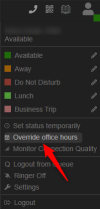
This feature is now under the department level and is triggered by the web client or PWA logged in with a user who has the appropriate role to override office hours:
 
  • Like
Reactions: Evolute IT
I would give a thumb down to this being removed, not everyone uses the web client. 3cx needs to keep the dial code in place.
 
Thank you @Charles_3CX.

As said by copetek there are few cases where the old code is much simpler: a night concierge that actually has access to DECT or Deskphones only would now need an active computer/smartphone (I cannot find the function on the Android app, by the way) to force the office time; 3cx should consider this (department based code would be fantastic).

What about CFD?
I couldn't find any direct parameter to assign a department, does it work with the default department only? We use it to manage an internal call (always that parking gate intercom), so assigning a DID is not a solution (maybe a false one as a workaround).
 
  • Like
Reactions: Tony Cave
Regarding your question, the dial codes to force the system in and out of office hours are not available in v20.

This feature is now under the department level and is triggered by the web client or PWA logged in with a user who has the appropriate role to override office hours:

Can this be added to the mobile client? Many of our users only use the mobile client. Never logged on the web client and don's use PWA.
 
Regarding your question, the dial codes to force the system in and out of office hours are not available in v20.

This feature is now under the department level and is triggered by the web client or PWA logged in with a user who has the appropriate role to override office hours:

Hello

This is 100% required for 99% of our customers, must have a "night switch" option.

Small offic's have times when they just need to leave early, and a manual night switch mode attached to a speed dial is the best way for them.

impossible to remove this basic function.
 
This is an option now in the Client where you can select to Overide the configured Office hours and also select to which department. However this requires that the user has an assigned Role that will allow this:

2024-02-27_09h02_29.png
2024-02-27_09h06_00.png
 
THANKS so much for this. Had a customer that desperately needs to keep this feature.
 
Hello

I have just upgraded a heap of my clients due to the forced process coming up soon and I have not seen any documented information anywhere this feature would be removed. We really need this reinstated as some of my clients do not use the webclient but handsets and the blf eys to put the business in and out of office hours.

Please advise.
 
Last edited:
This will be able using the 3CX Call API and force the PBX hours.
 
  • Like
Reactions: Evolute IT
The option is in the Web Client not in the Windows Softphone.
 
  • Like
Reactions: Evolute IT
Hello

I have just upgraded a heap of my clients due to the forced process coming up soon and I have not seen any documented information anywhere this feature would be removed. We really need this reinstated as some of my clients do not use the webclient but handsets and the blf eys to put the business in and out of office hours.

Please advise.
100% agree, so many if not most, don't have the 3CX app installed, so can't access it this way.

I would suggest that 90% of users don't have the APP on their mobile device.

Because they don't want a work app for the phone on their personal mobile.
The boss / owners don't want to have staff to have the 3CX app on their mobiles, so is not allowed.

It is completely ridiculous and irresponsible to remove this basic PBX function.

Most small businesses, if there's an emergency of some kind, they need to just be able to hit one button and leave, they don't have time to mess around installing apps on their phone to put the office in out of hours.

This most basic function needs to be added back into the 3CX system ASAP, Not having a afterhours / nightswitch option is 100% a deal breaker for nearly all of my customers.

There is no way we can do upgrades to V20 until this most basic function is included there is no way that our customers will accept losing this basic function, I am unsure what we are supposed to do or how we are going to move forward once the V18 support ends it's simply not a viable option it must be added immediately.

The platform needs to be flexible around customer needs not the other way around customers shouldn't have to be flexible to a system that removes features that every standard pbx system has something about this is all wrong.


Thanks
 
I just upgraded several clients this week and have run into the same problem. None of the forum posts had a viable solution.
But there is a production ready, 3CX supported solution that allows for the same ability to use a BLF key to turn on and off office hours just like we used to be able to do in V18 before departments were forced upon us.

The answer is to use a Call Flow App. If you need help creating one, feel free to reach out to me and I would be happy to help.
 
@astro65536 In V20 you have the ability to configure hours for Departments as well. Using the Dial code might also affect departments that do not want to be Forced In/Out.
The dial code will be able to be added using the Call Processing Script in Update 1 or 2. You may also check this guideline.
 
@astro65536 In V20 you have the ability to configure hours for Departments as well. Using the Dial code might also affect departments that do not want to be Forced In/Out.
The dial code will be able to be added using the Call Processing Script in Update 1 or 2. You may also check this guideline.
Can these scripts be accessed on hosted pbx
 
This is not an option for the 3CX Hosted installations.
 
I just upgraded several clients this week and have run into the same problem. None of the forum posts had a viable solution.
But there is a production ready, 3CX supported solution that allows for the same ability to use a BLF key to turn on and off office hours just like we used to be able to do in V18 before departments were forced upon us.

The answer is to use a Call Flow App. If you need help creating one, feel free to reach out to me and I would be happy to help.
@SuperUser
How do you do a call flow app to make this work? I just upgraded a customer and now I'm stuck as I can't change their via button like before. They have changing hours all the time and don't use the app.
 
Last edited:
Have you checked previous replies in this post for using the web client in order to Force the Office hours ?
 
Status
Not open for further replies.

Latest Posts

Forum statistics

Threads
111,953
Messages
589,915
Members
164,851
Latest member
DrunkeMeister