v20 How to edit the name of a DID?

Status
Not open for further replies.

tol

Silver Partner
Basic Certified
Joined
Dec 3, 2020
Messages
18
Reaction score
4
In Voice & Chat, DID Numbers. How can I edit the name of a DID? I can edit the number itself, but not the name?
 
Hi @tol

The way to edit the name of the DID is from where the DID is assigned.
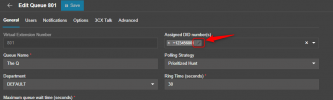
So for example if your DID is pointed to a queue, you go to Call Handling >> Edit the queue and click on the edit icon beside the DID number inside the "Assigned DID number(s)" field
2024-02-21_13h50_17.png
 
Thank you! Just missed this option.
 
  • Like
Reactions: jed
Hi plz hep Me.
after update V18 up V20 i dont know web admin plz hepl me.
When I use the old url, I get an error like the attached file.
 

Attachments

  • error.jpg
    error.jpg
    40.3 KB · Views: 24
Hi plz hep Me.
after update V18 up V20 i dont know web admin plz hepl me.
When I use the old url, I get an error like the attached file.
Just use your FQDN and the system owner Login
 
Hi plz hep Me.
after update V18 up V20 i dont know web admin plz hepl me.
When I use the old url, I get an error like the attached file.
That's a local IP and your post is in the self-hosted forum.

So either IP is wrong or you are in the wrong forum.

I would suggest starting a new thread.
 
Status
Not open for further replies.

Forum statistics

Threads
112,285
Messages
591,708
Members
165,408
Latest member
tom.walker@blackcountryra