- Joined
- Nov 30, 2022
- Messages
- 89
- Reaction score
- 6
Hey,
We have an IVR from where calls go to the queues. I made 3 departments, 1 fro IVR and queues, 1 for sales team and 1 for service team. Now, Sales and service team have office hours "whole day" and only users are added in these 2 departments.
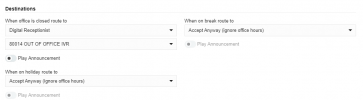
I set timimgs for IVR department to be 9-6 and other 2 department 12-12 but IVR is still ringing after office hours that is after 6pm. In IVR settings I have routed the calls after office hours to another IVR that is for off hours but still the calls are coming to office hour IVR after 6pm as well.
Can anyone please guide what is the setting I am missing? My aim is that users receive calls all day and IVR only 9-6.
We have an IVR from where calls go to the queues. I made 3 departments, 1 fro IVR and queues, 1 for sales team and 1 for service team. Now, Sales and service team have office hours "whole day" and only users are added in these 2 departments.
I set timimgs for IVR department to be 9-6 and other 2 department 12-12 but IVR is still ringing after office hours that is after 6pm. In IVR settings I have routed the calls after office hours to another IVR that is for off hours but still the calls are coming to office hour IVR after 6pm as well.
Can anyone please guide what is the setting I am missing? My aim is that users receive calls all day and IVR only 9-6.