V20 Park not working

Racomm

Trial User
Joined
Aug 24, 2022
Messages
9
Reaction score
0
We upgraded from V18 to V20 and the park buttons no longer work. I read on a thread that if you change the user types to receptionist, it will fix it, but it has not. Any assitance would be greatly appreciated!
 
When you say the button doesn't work what does happen? It shows the "SP1" but if you press it nothing happens?

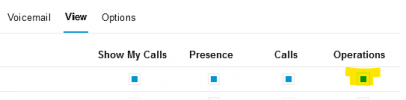
Originally in v20 the receptionist role could park calls but that was removed from the Roles. Is Operations checked on the User? here:
1726078679521.png
 
  • Like
Reactions: Plains_JosephW
I am told it disconnects the call. They do see the SP1. I am asking for more specifics. As for the Operations, it is checked for the department they are in. There are 4 departements, they are not checked for the others. I went ahead and checked all the departments Operations for each just to see if that makes a difference.
 
It says "temp unavailable" when pressed.
 
Where is the server hosted? If the phones are not on the same network are they set up as router phones? (or at least one of them) (a.k.a. "connect directly")
 
It is a premised based 3CX. V20 Linux
 
Not sure. You just plug the phone in on the local network, and it shows up on the 3CX to be programmed/assigned an extension. Do you have to do anything different? The FQDN is configured and working, but I never had to manually program a phone with an IP or FQDN.
 
If it's PnP I'd expect it to use the name. If adding the phone first, "Local LAN / VPN" has a "select interface" dropdown.

Is your license active/valid if you click the "License Owner" link on the dashboard?
 
It is valid. Where do you see the Local Lan/vpn? on the phone, or in the portal? I don't recall that ever prompting for it.
 
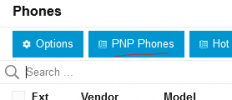
The phones are on the same network. But when I go to PNP Phones, none are listed there. We are using 5060 for SIP port. These are T4x phones.
 
Originally in v20 the receptionist role could park calls but that was removed from the Roles
Not sure why I wrote that like that. All roles have Park now: https://www.3cx.com/docs/manual/access-roles/

phones are on the same network
Is there anything that would block network traffic at the switch level?

Correct firmware?

What happens if you use a web client to park/unpark via BLF or right clicking, does that work?

T4 series instructions are at https://www.3cx.com/sip-phones/yealink-t4-series/. Basically the same.
 

Members Online Now

Forum statistics

Threads
111,835
Messages
589,289
Members
164,668
Latest member
Infinity Network