Solved v20 quality monitor from admin account

Status
Not open for further replies.

C.GOURDIEN

Bronze Partner
Advanced Certified
Joined
Sep 8, 2023
Messages
5
Reaction score
0
Hello,

I have a 3cx instance in v20. On this one, as the system owner, I can launch VoIP quality monitor on any user.
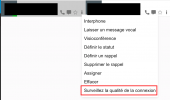
Capture d’écran 2024-05-23 à 12.26.32.png


I have another instance also in v20, on this one I don't have the option (I have the operation permission on all departments in the view tab, I have the system owner role).
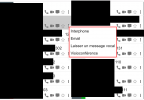
Capture d’écran 2024-05-23 à 12.31.08.png
 
Can you see the "admin" button at the bottom left? You may have IP restrictions in place.
 
Yes i can see the admin button, what ip restrictions should I look ?
 
Is this a Windows install?
 
That's an hosted by 3cx one
 
Hello,
Your "System Owner" account must be part of the same department as the users you want to monitor.
 
  • Like
Reactions: C.GOURDIEN
Hello,
Your "System Owner" account must be part of the same department as the users you want to monitor.
Thats it, i've added my "System Owner" account to the a departement with users inside and now i can launch the VOip quality monitor on that users.

Thanks
 
As mentioned you need to be in the same department in order to monitor the call call quality.
In any case glad to know this is resolved.
 
Status
Not open for further replies.

Latest Posts

Forum statistics

Threads
111,952
Messages
589,894
Members
164,844
Latest member
abctel2