- Joined
- Mar 30, 2010
- Messages
- 20
- Reaction score
- 0
This is surely a bug.
v.20 Update 2 (Build 715)
Setting up a new user for an existing client. There's a new phone number on the trunk specifically for this user. But as everyone tells me i should use "department" as the primary inbound rule, I set up a Dept for him, with him in it, and assign the DDI to the Dept, set up the in-hours, out-of-hours, etc., rules and then...
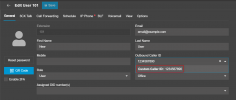
I go to edit the new user to put the new DDI in as his outbound CLI. It WILL NOT let me choose this number. It offers me a list this number is not on, and, if I type the number in it doesn't stick.
The only way I have been able to set it is
- assign the new DDI to ring directly to the user, "stealing" it from the Department
- having saved that, I can now choose this CLI from the list and save it for his Outbound CLI
- now assign the DDI back to the Department.
- The chosen CLI remains in the User general tab so I assume that has worked. But it's no longer in the "choose" list for the user, so if it ever got deleted by mistake I'd have to repeat this process.
v.20 Update 2 (Build 715)
Setting up a new user for an existing client. There's a new phone number on the trunk specifically for this user. But as everyone tells me i should use "department" as the primary inbound rule, I set up a Dept for him, with him in it, and assign the DDI to the Dept, set up the in-hours, out-of-hours, etc., rules and then...
I go to edit the new user to put the new DDI in as his outbound CLI. It WILL NOT let me choose this number. It offers me a list this number is not on, and, if I type the number in it doesn't stick.
The only way I have been able to set it is
- assign the new DDI to ring directly to the user, "stealing" it from the Department
- having saved that, I can now choose this CLI from the list and save it for his Outbound CLI
- now assign the DDI back to the Department.
- The chosen CLI remains in the User general tab so I assume that has worked. But it's no longer in the "choose" list for the user, so if it ever got deleted by mistake I'd have to repeat this process.