


- Joined
- Jan 29, 2020
- Messages
- 1
- Reaction score
- 2
Ive always wondered why the call routing was very touch and go with v20. Now i know!
It turns out Debian 12 doesn't have time sync built into it.
Since mine is a VM(Built a brand new Install of V20, not upgraded), i can access the console and use the command line in Debian 12.
Type: timedatectl and its shows the time sync status. This showed UTC and NZ Local time was way out of sync by several hours. Also showed no NTP or time sync was active. But it did have the correct time zone(assume it got this from 3CX when i set it in the options). I cant enable time sync because the service is not installed!
So then you need to install the time sync service as its not there by default in the 3CX distro.
sudo nano /etc/systemd/timesyncd.conf
add this one line: NTP=nz.pool.ntp.org
Save it.
sudo apt update
sudo apt install systemd-timesyncd
sudo systemctl enable systemd-timesyncd
sudo systemctl start systemd-timesyncd
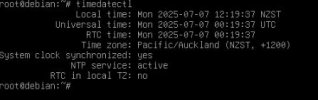
timedatectl status (This is what it should look like, with the correct time)
Restart 3CX Server.
I never found any mention of this during my research and wondered if anyone else figured this out. This is what i came up with. Hope it helps
It turns out Debian 12 doesn't have time sync built into it.
Since mine is a VM(Built a brand new Install of V20, not upgraded), i can access the console and use the command line in Debian 12.
Type: timedatectl and its shows the time sync status. This showed UTC and NZ Local time was way out of sync by several hours. Also showed no NTP or time sync was active. But it did have the correct time zone(assume it got this from 3CX when i set it in the options). I cant enable time sync because the service is not installed!
So then you need to install the time sync service as its not there by default in the 3CX distro.
sudo nano /etc/systemd/timesyncd.conf
add this one line: NTP=nz.pool.ntp.org
Save it.
sudo apt update
sudo apt install systemd-timesyncd
sudo systemctl enable systemd-timesyncd
sudo systemctl start systemd-timesyncd
timedatectl status (This is what it should look like, with the correct time)
Restart 3CX Server.
I never found any mention of this during my research and wondered if anyone else figured this out. This is what i came up with. Hope it helps


