


- Joined
- Jun 24, 2024
- Messages
- 11
- Reaction score
- 5
Hello,
I am investigating a caller ID / caller name issue with 3CX V20 Update 9, Build 995, using the PWA/Web Client and a SIP provider.
I believe there is an issue with how 3CX handles the incoming caller information from the SIP trunk and subsequently displays it in the PWA queue call history.
Instead, the queue/department name is displayed.
However:
The relevant headers are essentially:
With the current template mapping:
the caller number is correctly assigned to $CallerNum, but $CallerName is empty.
The PWA then does not fall back to $CallerNum when displaying an unknown caller in the abandoned queue-call list.
This produced another interesting result.
When using my original provider template, the caller's outgoing name is correctly displayed in the queue.
When using the modified/current template, the caller name is no longer displayed, only the number is shown.
The original template contains this inbound mapping:
Original template:
Caller number → displayed correctly
Caller name → displayed correctly
Modified template:
Caller number → available
Caller name → not available/displayed
And for an unknown caller, the PWA does not simply fall back to the available caller number.
The Windows Client does display the number correctly.
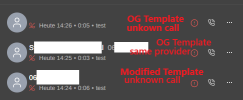
If no caller name is available, the PWA should fall back to displaying the caller number rather than displaying the queue name.
I would prefer to have the provider template and 3CX caller-ID handling configured correctly rather than relying on a workaround.
Thanks.
I am investigating a caller ID / caller name issue with 3CX V20 Update 9, Build 995, using the PWA/Web Client and a SIP provider.
I believe there is an issue with how 3CX handles the incoming caller information from the SIP trunk and subsequently displays it in the PWA queue call history.
Initial problem
For an incoming call to a queue from an unknown external number, the PWA's Abandoned Queue Calls list does not display the caller's phone number.Instead, the queue/department name is displayed.
However:
- The caller number is correctly present in the 3CX Event Log.
- Event 105 (Lost Call in Queue) contains the correct Caller ID.
- Searching the PWA call history for the caller's number finds the call.
- Opening the call in the PWA displays the caller's number.
- The Windows Client displays the caller's number correctly.
- If I add the caller's number to the 3CX contacts, the PWA displays the contact correctly.
SIP trace
I also checked the incoming SIP INVITE.The relevant headers are essentially:
There is no display name in the From header for this particular call.From: <sip:CALLER_NUMBER@...>
To: <sip:CALLED_NUMBER@...>
With the current template mapping:
<field name="ParameterIn" custom="" parameter="FromUserPart">$CallerNum</field>
<field name="ParameterIn" custom="" parameter="FromDisplayName">$CallerName</field>
<field name="ParameterIn" custom="" parameter="ToUserPart">$CalledNum</field>
the caller number is correctly assigned to $CallerNum, but $CallerName is empty.
The PWA then does not fall back to $CallerNum when displaying an unknown caller in the abandoned queue-call list.
Further testing with the provider
I then tested calls from another customer using the same SIP provider.This produced another interesting result.
When using my original provider template, the caller's outgoing name is correctly displayed in the queue.
When using the modified/current template, the caller name is no longer displayed, only the number is shown.
The original template contains this inbound mapping:
The modified template changed the caller-name mapping to:<field name="ParameterIn" custom="" parameter="FromUserPart">$CallerNum</field>
<field name="ParameterIn" custom="" parameter="FromDisplayName">$CallerName</field>
<field name="ParameterIn" custom="" parameter="ToUserPart">$CalledNum</field>
The first is logically more obvious from a SIP perspective, but it does not work correctly with this provider's caller-name presentation.<field name="ParameterIn" custom="" parameter="ToUserPart">$CalledNum</field>
<field name="ParameterIn" custom="" parameter="FromUserPart">$CallerName</field>
<field name="ParameterIn" custom="" parameter="FromUserPart">$CallerNum</field>
What I find confusing
The same SIP provider can apparently provide caller-name information, because:Original template:
Caller number → displayed correctly
Caller name → displayed correctly
Modified template:
Caller number → available
Caller name → not available/displayed
And for an unknown caller, the PWA does not simply fall back to the available caller number.
The Windows Client does display the number correctly.
Example
Expected behavior
For an incoming queue call, I would expect 3CX to consistently retain the caller number as the caller identity and use the caller name when one is available.If no caller name is available, the PWA should fall back to displaying the caller number rather than displaying the queue name.
Questions
Could someone from 3CX clarify:- How should $CallerNum and $CallerName be mapped for a provider that sends the caller number in FromUserPart?
- How should caller-name information from this type of provider be handled?
- Why does the PWA not fall back to $CallerNum when $CallerName is empty?
- Why does the Windows Client display the caller number correctly while the PWA abandoned-call list displays the queue name?
- Is mapping both $CallerNum and $CallerName to FromUserPart an intended/valid workaround for this situation?
I would prefer to have the provider template and 3CX caller-ID handling configured correctly rather than relying on a workaround.
Thanks.


