V20 Update 9 Final: Redesigned Web Client & Smarter AI

Looks amazing.

From my cell phone I can't figure out how to listen in or barge in on calls in progress. We used to be able to do this as admins from the the "Team" page (click 3 dots and it was on that menu). On the web app now you need to do this from the panel by right clicking the call but i can't do that on my phone. please advise. It would be great if it can be added back to the team page drop down menu

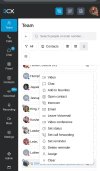
added an image to show you where it used to be (listen, barge in, whisper)

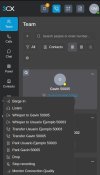
Edit 2: I figured out where it is but when you press it, it gets clipped so you cant see the whole menuimage0 (1).jpeg
 

Attachments

  • image0.jpeg
    image0.jpeg
    212.5 KB · Views: 12
Last edited:
  • Like
Reactions: N_G
Looks amazing.

From my cell phone I can't figure out how to listen in or barge in on calls in progress. We used to be able to do this as admins from the the "Team" page (click 3 dots and it was on that menu). On the web app now you need to do this from the panel by right clicking the call but i can't do that on my phone. please advise. It would be great if it can be added back to the team page drop down menu

added an image to show you where it used to be (listen, barge in, whisper)

Edit 2: I figured out where it is but when you press it, it gets clipped so you cant see the whole menu

Please note that the behavior you are seeing is correct for this version.

In Update 9, you need to navigate to the Panel interface to perform management actions on active calls.

When logged into the 3CX web client using a mobile browser, simply go to the Panel tab and press and hold the specific call entry. This action will open the context menu showing all available options, as shown in the attached screenshot.
 

Attachments

  • screenshotpanel.jpg
    screenshotpanel.jpg
    117.7 KB · Views: 21
  • Like
Reactions: Evolute IT
Please note that the behavior you are seeing is correct for this version.

In Update 9, you need to navigate to the Panel interface to perform management actions on active calls.

When logged into the 3CX web client using a mobile browser, simply go to the Panel tab and press and hold the specific call entry. This action will open the context menu showing all available options, as shown in the attached screenshot.
Press and hold is not working on iPhone -- it just highlights text
 
Press and hold is not working on iPhone -- it just highlights text
Call operations from Team Page still exists (if you have the necessary role and permissions)

Click on the blue hyperlink-like text under the extension name (Usually contains the name and/or number on a call with that extension). Operations will be made available
 
  • Like
Reactions: BrunoI_3CX
Please note that the behavior you are seeing is correct for this version.

In Update 9, you need to navigate to the Panel interface to perform management actions on active calls.

When logged into the 3CX web client using a mobile browser, simply go to the Panel tab and press and hold the specific call entry. This action will open the context menu showing all available options, as shown in the attached screenshot.

Call operations from Team Page still exists (if you have the necessary role and permissions)

Click on the blue hyperlink-like text under the extension name (Usually contains the name and/or number on a call with that extension). Operations will be made available

As @ThomB_3CX mentioned, you can still perform call operations from the Team page. Here's how it works:

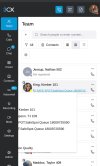
When an active call is in progress, navigate to the Team tab and locate the user involved in the call. Under the extension name, you will see a blue hyperlink-style entry with a phone icon, displaying the name and/or number associated with the active call, as shown in the attached image.

By clicking this entry, the available call operation options will be displayed, as shown in the attached screenshot.
 

Attachments

  • screenshotteam.jpg
    screenshotteam.jpg
    71.4 KB · Views: 19
The old electron app still works in update 9. In update 10 no more..... You can use the new windows softphone as well?
To help us move users away from Electron, is there any scope for implementing some sort of automated end-user provisioning of the new app?

I was thinking of something like a registry key to get the app to attempt automatic M365 login using the currently signed in identity, or similar.

This would also help a lot with greenfield deployments.
 
@wr-dp We are working on a roadmap for the softphone which will include some easy re provisioning methods, give us a few weeks to explain what we will do. We need some more time for update 10 and you wont have to install it right away so there is still some time
 
Last edited: