V20 Version Upgrades - Top Reasons for Aborting

The permission check was recently added to the upgrade script as part of an ongoing process to provide a trouble free migration (to the extent possible). You must have upgraded the first instance prior to the addition of this check.
But the already upgraded 3CX (running V20) was first upgraded to V20 RC1 and then upgraded to V20 Final, whereas the problematic 3CX was just upgraded directly to V20 Final.

Exactly.
Great clarification!

Thanks a lot.
 
we've been upgrading client systems methodically over the weekends since v20 went final. one things we're noticing is any customer that has had a system running EARLIER than 2016 and has been upgraded along the way, seems to fail. Don't really see anything blatantly obvious in the log file that gets sent, so we just spin up a new v18 and restore their backup. Then upgrade to v20 from there without incident.

I suspect it's from back before there was a 3cx deployment script on google compute engine. I think (if memory serves me right) that back in that timeframe it was all manual config to get a system running. so that's likely why they fail.
 
we've been upgrading client systems methodically over the weekends since v20 went final. one things we're noticing is any customer that has had a system running EARLIER than 2016 and has been upgraded along the way, seems to fail. Don't really see anything blatantly obvious in the log file that gets sent, so we just spin up a new v18 and restore their backup. Then upgrade to v20 from there without incident.

I suspect it's from back before there was a 3cx deployment script on google compute engine. I think (if memory serves me right) that back in that timeframe it was all manual config to get a system running. so that's likely why they fail.
You tried to upgrade from v16 to v20? That must fail for obvious reasons!
 
we've been upgrading client systems methodically over the weekends since v20 went final. one things we're noticing is any customer that has had a system running EARLIER than 2016 and has been upgraded along the way, seems to fail. Don't really see anything blatantly obvious in the log file that gets sent, so we just spin up a new v18 and restore their backup. Then upgrade to v20 from there without incident.

I suspect it's from back before there was a 3cx deployment script on google compute engine. I think (if memory serves me right) that back in that timeframe it was all manual config to get a system running. so that's likely why they fail.
We had also such old systems. The updater may change the interface names. We had a system that was originally installed with Debian 9 and the updates enable predictive names, lets call it half way. Now the updates clears it up and change it to eth*. You may run in the same issue
 
You tried to upgrade from v16 to v20? That must fail for obvious reasons!
no, they have been upgraded over the years. but the systems have been running since the V16 days.
 
  • Like
Reactions: accentlogic
no, they have been upgraded over the years. but the systems have been running since the V16 days.
If they are not installed from the iso (we did it over cli sometimes with v16), than this could be also your problem. The way to backup and restore ist the easiest way to get v20.
 
  • Like
Reactions: Evolute IT
If they are not installed from the iso (we did it over cli sometimes with v16), than this could be also your problem. The way to backup and restore ist the easiest way to get v20.
yeah they are all google cloud instances, i don't remember when the 3cx deployment script became readily available on google compute engine, but that's how most of these have been setup.
 
yeah they are all google cloud instances, i don't remember when the 3cx deployment script became readily available on google compute engine, but that's how most of these have been setup.
Than you have to install from iso restore the backup
 
  • Like
Reactions: Marcos_V
Than you have to install from iso restore the backup
assuming the 3cx provided google cloud images are their ISO, then agreed. otherwise we've been using a supported deployment method from 3cx on google's compute engine for a long while.
 
We found out today that CLI is not in the new Windows App, is this going to be added as we all use this and see it as a big feature.
 
  • Like
Reactions: Milo Elver
Hi, I need help please. I attempted to setup a new instance of 3cx v20 in AWS but loaded a backup of my v18 - I was able to restore but there are multiple issues.
Now im getting all types of issues on my v18.

In my 3cx client it showing still 18
1722941139035.png

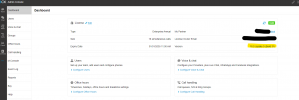
If I go to license I get this message.
1722941202612.png

I tried to upgrade to v20 within v18 but im getting the same

"result": "aborted",
"time": "06-08-2024 19:54:11",
"title": "File ownership problem",
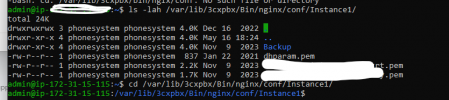
"message": "There are files under /var/lib/3cxpbx/Bin/nginx/conf with the wrong user and/or group ownership. Please make sure the files are owner by the user: phonesystem"

But it is already showing Phonesystem
1722941378095.png

Thank you!
 
Hi, I need help please. I attempted to setup a new instance of 3cx v20 in AWS but loaded a backup of my v18 - I was able to restore but there are multiple issues.
Now im getting all types of issues on my v18.

In my 3cx client it showing still 18
View attachment 43032

If I go to license I get this message.
View attachment 43033

I tried to upgrade to v20 within v18 but im getting the same

"result": "aborted",
"time": "06-08-2024 19:54:11",
"title": "File ownership problem",
"message": "There are files under /var/lib/3cxpbx/Bin/nginx/conf with the wrong user and/or group ownership. Please make sure the files are owner by the user: phonesystem"

But it is already showing Phonesystem
View attachment 43034

Thank you!
That's not v20. That's still v18.

Just take a backup, and fully reinstall on v20.

Make sure you have a system owner defined.
 
Probably been answered already, but if I create a v20 instance and restore from v18u9 backup, and for some reason I want to go back to v18, redeploy a v18 instance with the same backup. Is my license going to still be valid or is it stuck with v20?
 
Probably been answered already, but if I create a v20 instance and restore from v18u9 backup, and for some reason I want to go back to v18, redeploy a v18 instance with the same backup. Is my license going to still be valid or is it stuck with v20?
Stuck on v20. But you can probably contact support to downgrade the license for an urgent case.
 
Stuck on v20. But you can probably contact support to downgrade the license for an urgent case.

thank you.
that's not good news, I was already worried on migrating some instances, since we have a lot of preflight checks before migrating (dismiss eol devices, check stun phones and DECTs, split dns for local instances, check support for ATA gws, fix granular permissions set to extensions, fix department hours, check if there are dtmfs IVRs...).
I'm not sure I want to be in a situation I can't revert back to if something is not working if the upgrade is successful
 

Forum statistics

Threads
111,991
Messages
590,167
Members
164,929
Latest member
Cloudstar