Solved Video an Call Icon in chat window missing

Status
Not open for further replies.

beta_Rigel

Free User
Joined
Oct 21, 2020
Messages
35
Reaction score
8
Hi there,

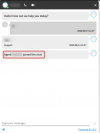
i have enabled the call and chat possibility in Chat, but cannot see the call and chat icon in the chat box? Is there a setup i am missing? how can the customer start a call or a video call when the buttons are not shown?

allow-call="true"
allow-video="true"

thank you for the help
1.JPG
 
Hi!

How have you integrated Live Chat into your website? Did you use the Wordpress Plugin or the Live Chat Code Generator?

Also how are you accessing your website, over HTTP over over HTTPS?
 
OK, in the Code Generator when it asked for a "callus" link, did you give it the link of a Individual Extension, or the link for a Queue.
To ask it differently too, where do messages go to when someone on the website sends a message, a specific extension or to a Queue where many extensions receive the notification for the incoming chat?
 
i gave it a link to a queue. Sorry ro bother you wirh this so much
 
i gave it a link to a queue. Sorry ro bother you wirh this so much
Not a Problem at all.
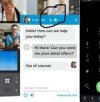
So when the Live Chat is sent to a Queue, in order for the Web Visitor to see the "Phone" and "Video" icons, a Queue Agent needs to take ownership of the Conversation:
1647250789971.png

Once this happens, then the icons should appear as shown above.
 
ah ok i see! thanky it works!
 
  • Like
Reactions: NickD_3CX
Excellent, glad we could help! :)

I'll mark this as 'Solved'.
 
Status
Not open for further replies.

Forum statistics

Threads
112,147
Messages
590,959
Members
165,167
Latest member
Finatra.us