Solved Video Conferencing app not working

Status
Not open for further replies.

Niels.Clavaux

Free User
Basic Certified
Joined
Mar 25, 2022
Messages
5
Reaction score
0
Hi peoples,

I would like to ask my question here. When i make a meeting with persons connected with the Video Conferencing app of 3CX. This is not working, The meeting and persons are in the meeting. Chatting is possible. But the audio and video are not connected. The screen is black from the other persons.

The phones has Android 11 en 12. I test it on 2 phones. On mobile 4G it's not working, when i change the APN to a firewall free APN it's working. But it's not safe to use always this APN.

Does anyone know a solution to this?

I have the same issue as https://www.3cx.com/community/threa...id-does-not-work-after-march-11-update.80479/ The screens are the same.

Important: an meeting from PC to PC works fine. Normally we do this as well.

Greetings,

Niels Clavaux
S&L Media
 
Last edited:
Hi @Niels.Clavaux,

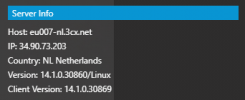
Can you tell me which Meeting server you're connected to? You can click the gear icon Settings >> the second tab that offers information and statistics, scroll down and you should see something like:

Untitled.png
 
Hi @Niels.Clavaux,

Can you tell me which Meeting server you're connected to? You can click the gear icon Settings >> the second tab that offers information and statistics, scroll down and you should see something like:

View attachment 29005
Hoi Vasilis,

Host: mcu-wmr-eu-02010.3cx.net
IP: 35.246.191.206
Land: DE Germany
Versie: 14.1.0.30857/Linux
Clientversie: 14.1.0.30869

This is the info from the info-field. Where can i change this server-location ?

Second thing that i see, is that it's happens only with 4G.

Greetings, Niels
 
Hi @Niels.Clavaux,

You won't be able to change the server specifically, only the region entirely. If you'd like to test you can check this in the Management Console >> Settings >> Conferencing >> Video Conferencing >> Select Your Region.
 
Hi @Niels.Clavaux,

You won't be able to change the server specifically, only the region entirely. If you'd like to test you can check this in the Management Console >> Settings >> Conferencing >> Video Conferencing >> Select Your Region.
Hi @VasilisV_3CX,

Yes, i test it now. To other country.

Host: as005-syd.3cx.net
IP: 45.76.122.109
Land: AU Australia
Versie: 14.1.0.30857/Linux
Clientversie: 14.1.0.30869

I have the same issues. What can i do ? I think that is because the used port to the 4G connection.
Greetings,

Niels
 
Hi Niels!

By the time you say that:
when i change the APN to a firewall free APN it's working.
I would have to say that this sounds like a network-related issue on the specific Mobile Provider.

If this is the case and the Provider you are using somehow blocks or throttles certain types of traffic, there is not a lot we as 3CX can do.
 
  • Like
Reactions: Evolute IT
Hi Niels!

By the time you say that:

I would have to say that this sounds like a network-related issue on the specific Mobile Provider.

If this is the case and the Provider you are using somehow blocks or throttles certain types of traffic, there is not a lot we as 3CX can do.
HI Nick,

I get what you mean. What I do think is that a large number of other web conferencing software, for example teams, zoom and webex normally work through the largest provider in the Netherlands. It's not that I have a weird construction that is very different.

Is it a possibility to look into this in the future to make this work on a normal 4G connection?

Greetings,

Niels
 
Is it a possibility to look into this in the future to make this work on a normal 4G connection?
It does work in a normal 4G connection, for myself and for thousands of other users according to our statistics.
The 0.1% in this case is your 4G connection.

Question, what is the name of the Mobile Provider you are currently using. If you use some other SIM card from another provider, does the same happen?
 
It does work in a normal 4G connection, for myself and for thousands of other users according to our statistics.
The 0.1% in this case is your 4G connection.

Question, what is the name of the Mobile Provider you are currently using. If you use some other SIM card from another provider, does the same happen?
I use KPN. It's a normal SIM with the APN "internet".

I understand that for you with users from all over the world, 1 individual users where t does not work, is not really important.

Greetings,

Niels
 
Last edited:
Do you have the ability to try from some other Mobile Network as well?
 
Status
Not open for further replies.

Latest Posts

Forum statistics

Threads
111,973
Messages
590,075
Members
164,895
Latest member
jasonkkrause