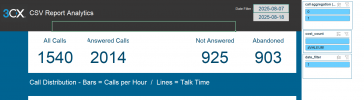
Visual Call Reports in MS Excel & Google Sheets

KyriacosS_3CX

Staff member
Joined
May 8, 2025
Messages
2,192
Reaction score
1,709

Templates for Google Sheets & Excel from CSV call logs.

A 3CX employee has created a prototype tool to help users generate visual reports from their PBX call log data in Microsoft Excel or Google Sheets. You’ll recall, the CDR system has been rewritten to improve data handling and support larger deployments. Larger deployme...
Continue reading the Original Blog Post.
 
I’m testing this in Excel and encountered several #VALUE errors.

It seems the issue is related to the date. In the Details tab, the Start date and time display correctly, but the End field shows #VALUE.

In the timeblock, the date appears in the format YY-08-13-16, which suggests the year is missing.

There are a few other errors as well, but let’s start by fixing this first set. :)
 
Hi,

Thanks for the feedback.

To make sure we are chasing any issues in the right way, can we get some general info - especially since excel can be very finicky with dates:

Was the data imported exactly as we mentioned in the guide?
Could you share the first few, and last few lines of the CSV you got from the 3CX Calls Report, in its text format - please anonymise phone numbers etc.
What Version and Locale is your Excel?

I’m testing this in Excel and encountered several #VALUE errors.

It seems the issue is related to the date. In the Details tab, the Start date and time display correctly, but the End field shows #VALUE.

In the timeblock, the date appears in the format YY-08-13-16, which suggests the year is missing.

There are a few other errors as well, but let’s start by fixing this first set. :)
 
hi,

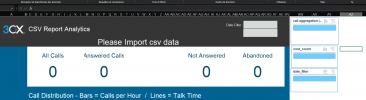
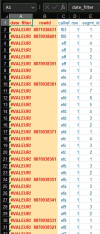
does not work at all for me, I have excel small enterprise 2021, I export CVS from 3cx , from all call, I copy from the first line without the column name , to the last one without total, I paste into the Data-input sheet, I click the refresh all and nothing happened ?
1755506775189.png
1755506791878.png
may be I missed something, I follow the instructions in french.
 
Last edited:
I copy from the first line without the column name
This copying is done from a plain text editor, Notepad, Notepad++. something like this, yes?
If you have call transcripts active - these add extra lines in excel that you should clear out in notepad preferably before importing.

Also for our reference, what version of the PBX is your source data from? Try adding for just a few hours if it's a busy system, to see how it responds.

If you have google sheets, try the data import there too, see if that one goes OK.
 
hi,
that was fast !
Yes I copy from bloc note windows

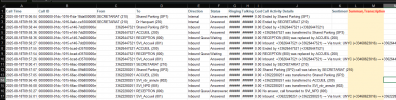
I join a screen capture of few lines, could you tell me if something should be deleted here ?

PBX Version 20.0 Update 6 (Build 724 Release)

1755507613323.png

system not busy today, I don't have google sheets
 

Attachments

  • lignes.jpg
    lignes.jpg
    109.3 KB · Views: 7
I’m testing this in Excel and encountered several #VALUE errors.

It seems the issue is related to the date. In the Details tab, the Start date and time display correctly, but the End field shows #VALUE.

In the timeblock, the date appears in the format YY-08-13-16, which suggests the year is missing.

There are a few other errors as well, but let’s start by fixing this first set. :)
Hello the creator of the files was having trouble to reply to you, so I am just relaying his feedback below:


Hello,

I am the maker of the excel sheet file.

1) The time block starts with a 2 digit year notation (to keep it shorter)

2) The important thing is to ensure that no conversion (of the date/time string) takes places by excel itself. Hence the copy paste (as text) prerogative.
When you import, It will convert the ringing/talking times automatically but this is expected and taken into account in the formulas

3) To repeat the process of getting errors, I took the template from the blog and then copied a csv data-file which I have from a production PBX. I did not get the errors that you described. This was with a correct import... I did needed to refresh all a couple of times in order to get the slicers to the value of one and in the filter-dates, a date. (as is described in the explicatory text)

4) Lastly in the final moments with the excel file the transcriptions can cause trouble. that is to say that some of it appears on a next line. To check if this is the case: the total is given on the last line. the row number of the last line of data should be 1 more than this total (this is the header on the first line) If it is more than one this would indicate dat transcription textes have been wrongly interpreted by excel and a shift has happened of the values in columns... This needs to be remedied in another program (notepad and alike) Personally, I have seen this happen, but have not looked for the precise origin yet. It would be finding the breaking char, removing it with find/replace and if it is the same char as the standard end of line, I would put in a marking value to be able to put them in afterwards, like( \n2025=>\n$$$2025) now removing the new line char(\n) I can put it back for all the data-lines( $$$2025=>\n2025)

5) can you add some detailed screenshots
- of where is the #value (which column), is it the entire column, or just a portion.
- The input field with the original timestamp still reads the same (T between date and time, date in yyyy-mm-dd format, time in hh:mm:ss format
 
I join a screen capture of few lines, could you tell me if something should be deleted here ?
Looks OK.

If you wish, Direct Message me those lines and I will try them here too.

I think the 2021 Excel is the latest named version, it gets all the MS365 updates, so that should be OK.
 
@MITIIMS ,

I have tried a small section of your data, and for me it did load.

A) The excel template is prepped for up to 5000 lines of data, to do more you need to go UNHIDE -> Data-Output tab and copy the formulas from line 5000 down until the line number you need, before importing data. Did you do this step?

B) The Template is English language "specific" for now, meaning that some special characters or other language values for PBX functions might not register OK - your exported data seems to be in English for PBX values, but names of contacts/extensions might still on occasion be problematic.
 
hi

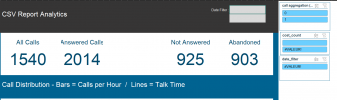
thank you for the tutorial, I still have a small hiccup, with the date value. I follow scrupulously your video but still get this error. Strangely the first time the only error was from cost_count but now date_filter is the same ! almost there 0:)

1755589960638.png

1755590056229.png

1755590161794.png
 
ha after i choose the date i get this

1755590324953.png
 
Hi,

It must be something to do with the cost column data type in Date-Input, that's all I can think of.. Try changing it to "General", that's what I have, no decimals are shown for 0s, and it seems to pick things up fine.
 
  • Like
Reactions: MITIIMS
@KyriacosS_3CX

Hello,

CSV is without transcriptions.
This is in Data-Input:
1755613019914.png
Details will give this result:

1755613025047.png

Regards.
 
Hi @kristofdb ,

Excel can be very strange, my only thought is to see if any Data-Input field is not set to General data type.
 
Hi ,

the orange/red column A in excel is the value set, when the date is activated!! this is the reason: instead of having a long list of values, it reduces the choice to zero and one, which can be set simultaneously on all the pivot tables at once (it is a work-around...).

So, when you import the data and hit refresh the minDate and maxDate are not set as yet. ans in this formula: =IF(C2<>"";IF(L2>=minDate;IF(L2<=maxDate;1;0);0);"")

the Dashboard Datefilter drop downs are fed by the hidden sheet Helpers the range is initially set to zero,zero=>which gives not zero, not one, but no value....


[td width="157px"]
Helpers!$G$0:$G$0


[/td]


That's why a second refresh is neccesary. it is so all the pivot tables re-calculate...

For completion, ranges ar set based on the selected values of the datefilter, sorted by first smalles then biggest:
minDate (hidden sheet) Metrics!N5
maxDate (hidden sheet) Metrics!N6
 
  • Like
Reactions: KyriacosS_3CX
Hi (@kristofdb and @MITIIMS),

-when cost decimal delimiter is not a dot (.)-

1) Unhide the hidden sheet Data-Output.
2) Please change the formula of the first row
'Data-Output'!G2 ==> formula: =IF($C2<>"";'Data-Input'!I2;"")
into this new formula:
=IF($C2<>"";VALUE(SUBSTITUTE('Data-Input'!I2;".";""))/100;"")
3) then copy past downward this new formula and cost should give no problems
 
  • Like
Reactions: KyriacosS_3CX
Hi @kristofdb,

Detailed information comes from a hidden sorting sheet, Helpers, where we can find the data output column references for those fields.

the filed end refers-to 13 column
start ==> col 12 ==> M
end ==> col 13 ==> N
duration(m) ==> col 21 ==> V

to calculate this it separates days and seconds of the current day:
Using DATEVALUE (days as in the integer before the comma for example :45821)
Using TIMEVALUE (time in hh::mm::ss format)

start:45821,952546
end: 45821,952882
duration => (0,952882-0,952546)x86400 seconds in a day


If your excel version has not DATEVALUE or TIMEVALUE it will not work. If the sart or endvalue on Data-Output looks different than the abover, it will not work...
 
@Quirilianus

Thank you, you’ve pointed me in the right direction :-) Problem solved!

We’re working with Excel in another language. The formulas were translated correctly, but the date and time formats were not.

As an end user, I would still expect to be able to drill down into the information.

But as with all reports: it ultimately comes down to how the data is interpreted :-)
 
Hi,

Simplify imports remove uneccesary newlines:

For removing unwanted newlines that can cause trouble in Excel,
In Summary or Transcription, use simply \n (newline)
in a sequence of find/replace commands:

In any decent text-editor (notepad, notepad++ and alike)

A) This is the removal scenario:
1) Totals
- FIND: \nTotals
- REPLACE: $$$$$Totals
2) Year (2025 as we speak)
- FIND: \n2025
- REPLACE: $$$$2025
3) All other newlines if present, replace them with ||
- FIND: \n
- REPLACE: ||

B) Now set back the needed new lines
4) Totals
- FIND: $$$$$Totals
- REPLACE: \nTotals
5) Year
- FIND: $$$$2025
- REPLACE: \n2025
 
  • Like
Reactions: KyriacosS_3CX

Forum statistics

Threads
111,992
Messages
590,171
Members
164,929
Latest member
Cloudstar