Voicemail issues

Status
Not open for further replies.

ross.downie1

Silver Partner
Basic Certified
Joined
Nov 17, 2019
Messages
11
Reaction score
1
The issue we have on this is odd. We have a DID number that is routed direct to a user, The voicemail is enabled, The forward option is set to Forward to Voicemail.

Now when a call comes in it reaches the voicemail of the first ring group and not the user's Voicemail(Number is not routed to group). If I choose the option for forward to extension voicemail it reverts back to forward to voicemail. and calls do not ever reach the user's voicemail.

So my question is how do we route calls to the users own Voicemail, As the forward to extension and selecting the extension i am setting up does not work anymore. We can't see how the call is reaching the group Voicemail at all as there is no option to set the destination on forward to voicemail only option.
 
I'm not quite sure I completely understood the situation.

To allow us to better understand could please provide/confirm the following information:

1. A specific DID routes directly to an extension for In office hours. Where does the out of office routing for this DID go?

2. You say "the forward option is set to forward to voicemail". Which forward option are you referring to exactly? Is it of the extension? If yes, which exact forwarding rule?

3.
If I choose the option for forward to extension voicemail it reverts back to forward to voicemail.
What options are you referring to here and where.

4. Are absolutely no DIDs routing to the Ring Groups voicemail you mention?
Go to "SIP Trunks >> Edit the SIP Trunk(s)", scroll down to where it says "Route Calls to" and check if any routing sends calls to the said Ring Group's voicemail.
 
Thanks for getting back to me.

So the situation is basically the calls are going to a group voicemail, Not the users voicemail.

1. A specific DID routes directly to an extension for In office hours. Where does the out of office routing for this DID go?
This is just the extension options. The out of office for the number should be the users voicemail, But this fails. It ends up at a group voicemail. It has no inbound rule for it. it is only set on the Extension.


2. You say "the forward option is set to forward to voicemail". Which forward option are you referring to exactly? Is it of the extension? If yes, which exact forwarding rule?
Yes just on the extension, For the status of available, For both internal and external calls. is set to Forward to voicemail, Time out set to 20 seconds.

3. The extension forwarding rules. And i selected the extension i was editing in the drop down. extn number 8009

4. Are absolutely no DIDs routing to the Ring Groups voicemail you mention?
Go to "SIP Trunks >> Edit the SIP Trunk(s)", scroll down to where it says "Route Calls to" and check if any routing sends calls to the said Ring Group's voicemail.

Yes a different DID is routing to that and the SIP trunk is set to rout calls to the main group. However this should not affect call routing for a users DID Should it?
 
Yes a different DID is routing to that and the SIP trunk is set to rout calls to the main group. However this should not affect call routing for a users DID Should it?
If the DID is matched correctly when the Incoming call reaches the PBX it should not no.

To explain even further, if you have a DID 123456 and you also have a DID Rule for this DID(123456) that routes to an extension, then an incoming call to DID number 123456 should follow that rule and go to the extension.

If for any reason, the calls that comes in does not match the DID exactly, it might follow the routing on the SIP Trunks level.

What I recommend you do first is change the routing on the SIP Trunk level to see if that is what is being followed. If this is the case, we'll at least be able to narrow it down and act accordingly. Please give it a go and let me know what happens.
 
OK so far as i can see the call flow for this is as follows, Call reached the PBX and rings the user with no issues. (No inbound rule set for the DID). Then if busy or unable to answer the calls goes to the group voicemail. This is in office hours also.

Now what i am expecting is for that call to end in the users mailbox. Not the group mail box, I will make the changes requested above and advise of the outcome soon.

Regards.
 
OK so far as i can see the call flow for this is as follows, Call reached the PBX and rings the user with no issues. (No inbound rule set for the DID). Then if busy or unable to answer the calls goes to the group voicemail. This is in office hours also.
Just to clarify a few things.

• What do you mean by "no Inbound rule is set for the DID"? If you want calls to go directly to an extension based on the DID called, then you need a DID Inbound Rule to route calls to that extension in the "Inbound Rules" section. Is this not what you have? If not, how are the calls reaching the extension, do they first go to a Ring Group, Call Queue or some other routing?

• When you say "if busy or unable to answer" do you mean if the extension is busy on another call or rings without answering(call timeout)? If yes, does that mean that you can replicate the issue by making a call, then the extension rings for 20 seconds, but then the call is routed to the group voicemail rather than the extension's voicemail? If yes, are both the timeout forwarding on the Available status for Internal AND External calls set to "forward to Extension's Voicemail"?

I'd also make sure that the extension is in the "Available" status and not in the "Lunch(Custom 1)" status.

• Does this same extension happen to be in a Ring Group or Call Queue?


Now what i am expecting is for that call to end in the users mailbox. Not the group mail box, I will make the changes requested above and advise of the outcome soon.
Let me know how it goes!
 
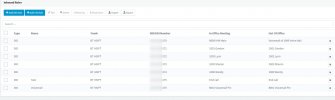
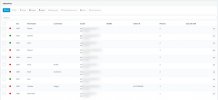
OK so please see attached file named Inbound rules.png. The DID number for the user is xxxxxxxx508, This rings the user when called. However is not in the rules page.

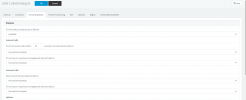
For busy or no answer please see attached file named extn.png.

All statuses are set to the forward to voicemail option.


• Does this same extension happen to be in a Ring Group or Call Queue? Yes they are a member of the ring group for a different DID number. Is this relevant here?


• When you say "if busy or unable to answer" do you mean if the extension is busy on another call or rings without answering(call timeout)? If yes, does that mean that you can replicate the issue by making a call, then the extension rings for 20 seconds, but then the call is routed to the group voicemail rather than the extension's voicemail? If yes, are both the timeout forwarding on the Available status for Internal AND External calls set to "forward to Extension's Voicemail"?

Well no, As stated above, it reverts back to forward to voicemail. If i set it to "forward to Extension's Voicemail" and select the same extension from the dropdown. next time i click to edit the user it is back to "forward to voicemail"
But the call goes to the voicemail for group 8000. not to user 1009.


I have also uploaded the forward rules for the user. named forward rules.png.
 

Attachments

  • forward rules.PNG
    forward rules.PNG
    32.8 KB · Views: 2
  • 2021-08-04_14h40_02.jpg
    2021-08-04_14h40_02.jpg
    73.7 KB · Views: 2
  • 2021-08-04_14h40_34.jpg
    2021-08-04_14h40_34.jpg
    78.2 KB · Views: 2
Does this same extension happen to be in a Ring Group or Call Queue? Yes they are a member of the ring group for a different DID number. Is this relevant here?
It may be yes, I am asking because, what might be happening is that the call is reaching the extension through some other way (Call Queue, Ring Group) and it may be that component that is routing the call to the Group voicemail later.

Well no, As stated above, it reverts back to forward to voicemail. If i set it to "forward to Extension's Voicemail" and select the same extension from the dropdown. next time i click to edit the user it is back to "forward to voicemail"
I see, I may have misunderstood this initially. If this is the case, then everything is normal because the "Forward to Extension Voicemail" is for sending the call to a different extension voicemail. The "Forward to voicemail" is to send the call to the same extension's voicemail. So if you select the same extension when using the "Forward to extension Voicemail" 3CX will automatically have it replaced with "forward to voicemail" as that is actually what will be happening.

The DID number for the user is xxxxxxxx508, This rings the user when called.
I see where the misunderstanding may have been. The fact that this number is set as the Extensions Outbound Caller ID, does not mean that calls to it will route to this extension. It just means that outbound calls from this extension will show this number as the Caller ID. If you need calls to a specific DID number to reach an extension you absolutely need an Inbound DID rule. You can create one from the Inbound Rules manually, or go to the Extension's page, click on General and scroll down to where it says "Direct Inbound Dialing (DID)", assign the DID to this extension by adding it here.
 
Status
Not open for further replies.

Latest Posts

Forum statistics

Threads
111,982
Messages
590,119
Members
164,908
Latest member
FarizQasimov