VoiceMail PlayFile stuck

Status
Not open for further replies.

aryxon

Forum User
Basic Certified
Joined
Apr 24, 2019
Messages
6
Reaction score
0
Hi,

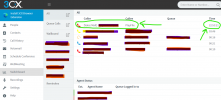
One of the agents played a voicemail and it stuck on the queue. How can I terminate this call (or fileplay)?


1610695657304.png


If the call cannot be seen in the "Active calls section", and if it cannot be dropped from within the Webclient Switchboard by, you may need to restart the 3CX Services.

If this is the case, navigate to Dashboard >> Services and only reboot the 3CX Database Server, this will reboot all other core 3CX services along with it due to dependencies. Since this will render the 3CX PBX temporarily unavailable and also drop any active calls, we of course strongly recommend that this task is performed during Out of Office hours to avoid downtime.
 
Last edited:
@aryxon

You could try dropping the call from within the Management Console >> Dashboard >> Number of Calls in use, find the call and then click on the cross icon on the right hand side.
 
@aryxon

You could try dropping the call from within the Management Console >> Dashboard >> Number of Calls in use, find the call and then click on the cross icon on the right hand side.
Sorry, but it is not a call. And this is why there is no such Call in Active Calls
 
If the call cannot be seen in the "Active calls section", and if it cannot be dropped from within the Webclient Switchboard by, you may need to restart the 3CX Services.

If this is the case, navigate to Dashboard >> Services and only reboot the 3CX Database Server, this will reboot all other core 3CX services along with it due to dependencies. Since this will render the 3CX PBX temporarily unavailable and also drop any active calls, we of course strongly recommend that this task is performed during Out of Office hours to avoid downtime.
 
  • Like
Reactions: aryxon
If the call cannot be seen in the "Active calls section", and if it cannot be dropped from within the Webclient Switchboard by, you may need to restart the 3CX Services.

If this is the case, navigate to Dashboard >> Services and only reboot the 3CX Database Server, this will reboot all other core 3CX services along with it due to dependencies. Since this will render the 3CX PBX temporarily unavailable and also drop any active calls, we of course strongly recommend that this task is performed during Out of Office hours to avoid downtime.
Thanks for solution. It helped.
But it mustn't be the only solution for such problems. Stopping entire service for one stuck, it is not adequate. I hope you'll make a button or something else.
 
Was the agent in question still able to make and receive calls?
 
Well then... you were not forced the reboot the services during business hours. Just a glitch in the matrix. Wait until out of hours and reboot it. From time to time IT stops working correctly and reboots are neccessary.
 
  • Like
Reactions: aryxon
I rebooted it at lunch time, it is OK. I couldn't press right button on it. For example, as a manager I can end any call in 3CX Client with Switchboard by clicking the right button on it, but this time clicking the right button didn't react. Not any menu was appearing
 
@aryxon

Glad to hear you were able to remove it. Just keep in mind that the issue may be related to a call flow which involved playing a voicemail/recording/prompt to a specific extension and then having that call diverted or transferred to a voicemail box.
 
  • Like
Reactions: aryxon
Status
Not open for further replies.